

Ensure consistent branding in Klaviyo emails for retention
TL;DR:
- Consistent branding across all Klaviyo emails enhances customer trust and boosts revenue.
- Using brand assets and universal content blocks ensures automated, uniform design updates.
- Regular quarterly audits of active flows are crucial to maintain branding and maximize performance.
Your welcome email looks polished and on-brand. Your abandoned cart reminder? A different font, mismatched colors, and a logo that’s oddly small. For your customer, this is jarring. It quietly signals that your brand isn’t quite put-together, and that erodes trust faster than any bad review ever could. Email automations generate 41% of email revenue from just 5.3% of sends, making consistency in every flow a direct revenue issue. This guide walks you through the preparation, execution, and ongoing verification steps needed to lock in consistent branding across every Klaviyo email you send.
Table of Contents
- What you need for consistent email branding in Klaviyo
- Set up brand defaults and reusable blocks
- Update existing flows and audit for gaps
- Optimize and scale consistency for engagement and revenue
- Why most brands miss the mark on consistent email branding: Our take
- Ready to unify email branding for higher retention?
- Frequently asked questions
Key Takeaways
| Point | Details |
|---|---|
| Centralize brand assets | Store logos, hex codes, and key visuals in Klaviyo’s brand settings for new templates. |
| Use reusable blocks | Universal Content Blocks keep branding uniform—one edit updates all emails instantly. |
| Audit and update old flows | Consistent branding requires manual review of legacy flows to avoid mismatched experiences. |
| Consistency boosts revenue | Coordinated branding in automations produces higher retention and up to 9.6x conversion compared to campaigns. |
What you need for consistent email branding in Klaviyo
Before you touch a single template, gather every branding asset you own. Think of this the same way a contractor needs blueprints before breaking ground. You are setting up rules that your entire email program will follow, so every asset must be accurate and finalized before you input anything into Klaviyo.
Here are the core branding elements you need to collect:
- Primary logo file (PNG with transparent background, minimum 300px wide)
- Hex color codes for your primary, secondary, and accent colors
- Web-safe fonts or Google Fonts used on your website and other brand materials
- Header link URL (usually your homepage or a key landing page)
- Footer content including physical address, unsubscribe language, and copyright line
- Social media icons and URLs for all active platforms
- CTA button colors and text styles that match your site’s design language
The reason matching your website matters so much is simple recognition. When a subscriber clicks through from your email to your site, the visual language should feel continuous. A jarring disconnect between email and landing page increases bounce rates and undermines the purchase decision. Establishing visual and brand consistency across all touchpoints is a foundational growth strategy, not just a design preference.
Klaviyo provides centralized brand settings for logos, hex color codes, header links, and social icons that apply as defaults for new templates and flows. You find these under your account settings in the “Brand Library” area. Input everything there first. Think of it as your brand’s single source of truth inside the platform.
One critical point most brands miss: these settings only apply to new content going forward. Any flow or template created before you set up the brand defaults will not automatically update. Keep that in mind because it means proactive asset management is non-negotiable. You will need to go back and manually update older content, which we cover in detail later.
Staying current with color trends for ecommerce can also sharpen your visual positioning when refreshing brand assets seasonally, so bookmark that research as part of your planning.
Pro Tip: Use a design tool like Figma or even a simple spreadsheet to document every exact hex code, font name, and font size before logging into Klaviyo. This small preparation step saves hours of hunting through old design files when you’re mid-setup.
| Asset | Where it lives in Klaviyo |
|---|---|
| Logo | Brand Library > Logo |
| Primary color | Brand Library > Colors |
| Font family | Template builder > Global Styles |
| Footer text | Universal Content Block |
| Social links | Brand Library > Social Icons |
Set up brand defaults and reusable blocks
With your assets ready, you can now implement branding controls that automatically enforce consistency in every new email you create.
Here is the step-by-step process for setting up brand defaults and Universal Content Blocks:
- Navigate to your Klaviyo account settings and open the Brand Library. Upload your logo, add your hex codes, and save your social icons.
- Open the template builder and go to Global Styles. Set your default font, button color, background color, and link color. Every new template will inherit these settings automatically.
- Create a Universal Content Block for your header. This block includes your logo, navigation links, and header background. Name it clearly, such as “Brand Header v1.”
- Create a Universal Content Block for your footer. Include your address, legal copy, social icons, and unsubscribe link. This footer will be identical in every email.
- Save both blocks and apply them to all new flow templates going forward.
- Test a new email to confirm the defaults are pulling in correctly before building out full campaigns or flows.
Universal Content Blocks allow you to create reusable sections that update across all emails the moment you edit the block once. That is the real power here. If your logo changes or your phone number updates, you fix it in one place and every email containing that block reflects the change immediately.

Global style settings in Klaviyo’s template builder can lock fonts, colors, and logos, and Klaviyo offers over 160 customizable templates to give you a strong starting point. That’s a significant library to work from, especially if you are rebuilding several flows at once.
Here is a clear comparison to help you understand which tool to use when:
| Method | Best for | Auto-updates? | Effort level |
|---|---|---|---|
| Default brand settings | New templates and flows | Yes (new only) | Low |
| Universal Content Blocks | Headers, footers, recurring elements | Yes (everywhere) | Medium |
| Manual update | Legacy templates | No | High |
The hybrid approach of combining HTML editing with drag-and-drop works well for brands with complex visual requirements. If your header includes custom animations or intricate layouts, build the structure in HTML and overlay it with Klaviyo’s drag-and-drop layer for future-proofing. This matters especially for branding with Klaviyo automation where your flows need to look exactly right across dozens of touchpoints.
One underrated tactic is repurposing branded content from your social posts and blog into your email templates. When the visual identity of your content is consistent across channels, brand recognition compounds over time.
Pro Tip: Star your most-used Universal Content Blocks in Klaviyo so they appear at the top of your content library. When a designer or team member builds a new flow, starred blocks are the first thing they see, reducing the chance of someone building a custom header from scratch and drifting off-brand.
Update existing flows and audit for gaps
While new templates are covered by your freshly configured defaults, legacy flows must be brought up to standard so your branding is consistent in every message your customers actually receive today.
This is the part most ecommerce brands skip or delay, and it is a serious mistake. Active flows like your welcome series, browse abandonment, post-purchase sequence, and win-back campaigns are firing every single day. If those still have old logos, off-brand colors, or inconsistent button styles, your customers are seeing that mismatch constantly.
Edge case: Brand changes don’t retroactively apply in Klaviyo. A manual audit of all active flows is critical to prevent disjointed experiences that quietly erode customer trust over time. This is the single most overlooked step in brand refresh projects.
Here is how to systematically audit and update your existing flows:
- Pull a list of all active flows from your Klaviyo dashboard. Sort by email volume or revenue to prioritize.
- Start with your highest-revenue flows. For most ecommerce brands, that means Welcome Series, Abandoned Cart, and Post-Purchase flows first.
- Open each flow and click into every individual email. Do not just check the first email in the series. Check every step.
- Screenshot or export the current design before making changes so you have a before-and-after record.
- Replace old headers and footers with your new Universal Content Blocks where possible.
- Update CTA button colors, fonts, and logo to match your new brand standards.
- Preview on mobile and desktop before saving each updated email.
Refer to a content audit process to build a structured checklist you can hand off to your team or agency so no email slips through.
Here is a quick checklist for each email you audit:
- Header logo correct size and version
- Primary and secondary colors match hex codes exactly
- Body font matches brand standard
- CTA buttons use brand button color and font
- Footer has current address and legal copy
- Social icons link to active profiles
- Unsubscribe link is functional and visible
Manual audit of active flows is critical because brand changes simply do not retroactively apply in Klaviyo. Skipping this step means your customers in an active post-purchase sequence are still receiving emails that look like they came from a different company than your welcome email.
Prioritizing by revenue impact is the smart move. Your abandoned cart flow is likely recovering thousands of dollars per month. That flow should be audited and updated before you touch a lower-traffic educational sequence. The ROI of fixing high-traffic flows first is immediate.
Optimize and scale consistency for engagement and revenue
Now that your flows are up to date, optimizing and scaling branding consistency amplifies engagement and drives real business results you can measure.
Consistent branding is not just a design preference. It is a conversion lever. Browse abandonment flows with consistent branding achieve up to 9.6x the conversion rate of general campaigns. That number reflects what happens when every email your subscriber receives reinforces the same visual identity and tone of voice, building the kind of familiarity that drives purchases.
Here is a performance benchmark table showing what you can expect from well-branded, optimized flows:
| Flow type | Avg. open rate | Avg. click rate | Order placed rate |
|---|---|---|---|
| Welcome series | 45-55% | 8-12% | 3-5% |
| Abandoned cart | 38-48% | 6-10% | 5-8% |
| Browse abandonment | 30-42% | 5-9% | 2-4% |
| Post-purchase | 40-52% | 7-11% | 4-7% |
| Win-back | 18-28% | 3-6% | 1-3% |
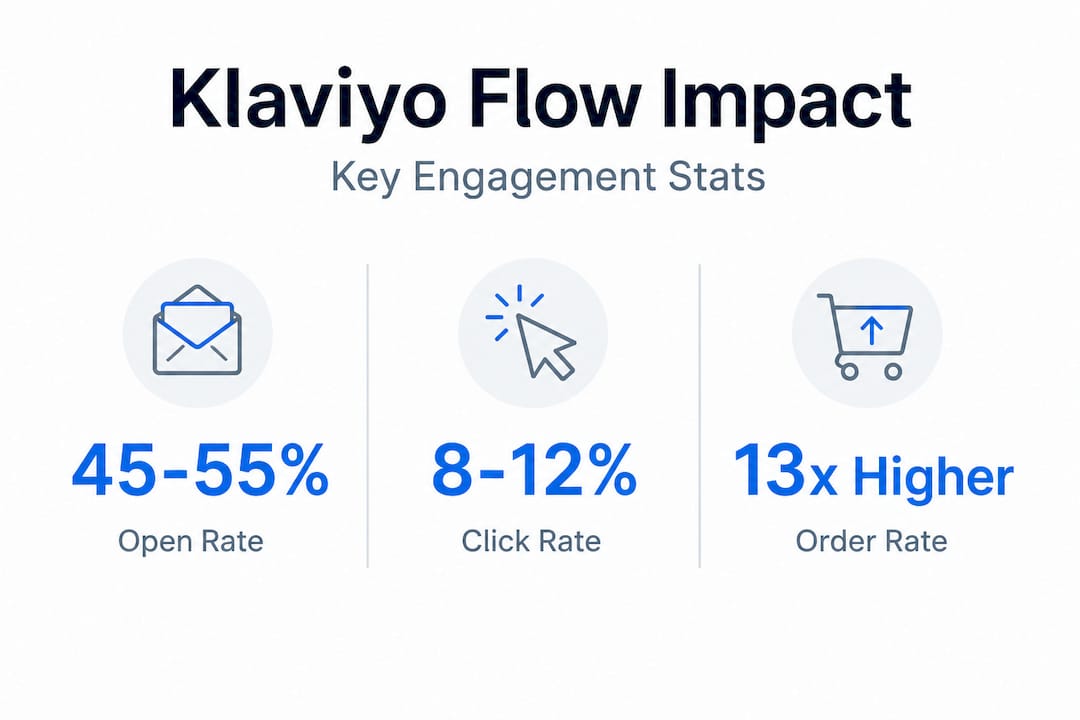
Flows deliver 13x higher order rates than standard broadcast campaigns, which makes every dollar you invest in brand consistency inside your flows exponentially more valuable than perfecting a one-time newsletter.
Smile Brilliant achieved a 47% year-over-year flow revenue increase and a 39x ROI through consistent, personalized automations in Klaviyo. That result did not come from better discounts or more aggressive sending frequency. It came from building a system where every email looked, felt, and read like it came from the same trusted brand.
Here are the best practices for scaling consistency as your team and catalog grow:
- Mobile-first design review. Over 60% of emails are opened on mobile. Every brand update must be previewed on a mobile screen before it goes live.
- Exact hex code matching. Never eyeball colors. Always copy and paste hex codes directly from your brand document into every field.
- Scheduled A/B testing. Test subject lines and content variations freely, but keep the visual brand constant in every variant. Mixing brand variables into a creative test contaminates your results.
- Quarterly brand audits. Set a calendar reminder every three months to review all active flows against your current brand standards.
- Use Klaviyo’s preview and test send tools before publishing any updated flow email. Send yourself a test on multiple devices.
For deeper engagement, pairing consistent visuals with Klaviyo personalization strategies creates a one-two punch where your emails feel both familiar and personally relevant. That combination is what turns one-time buyers into loyal repeat customers. Complementing your flow strategy with strong newsletter ideas for retention also keeps your brand top-of-mind between automated touchpoints.
For brands with developer resources, Klaviyo’s Universal Content API allows programmatic updates to reusable blocks across all emails simultaneously. This is the most scalable option for large catalogs or brands running multiple sub-brands under one account.
Why most brands miss the mark on consistent email branding: Our take
The most common mistake we see is treating email branding as a one-time setup task. A team spends a solid day configuring brand defaults, creates a beautiful Universal Content Block, and then considers the job done. Six months later, a new flow gets built in a hurry, the designer uses a slightly different shade of blue because they couldn’t find the brand doc, and the drift begins.
AI-driven tools like Adobe Brand Intelligence are advancing in creative compliance, but they are not as deeply integrated into lifecycle email flows as Klaviyo’s own brand tools. The gap between automated creative governance and real-world email production is still filled by process and people, not software.
The uncomfortable truth is that brand consistency is a team behavior problem as much as it is a tool configuration problem. New hires, agency handoffs, and seasonal rushes are the three moments when brand drift is most likely to happen. Without a documented briefing process and a single source of truth for brand assets, even the best Klaviyo setup will drift within a year.
Our recommendation: treat top email automation tools and platform features as the foundation, and layer deliberate process on top. Quarterly audits, standardized creative briefs, and named brand champions inside your team do more long-term work than any feature set.
Pro Tip: Schedule your quarterly flow audit as a recurring calendar event and assign one person as the brand owner for email. Accountability is the missing ingredient in most brand consistency strategies.
No platform fully automates creative compliance. The brands that win on retention are the ones that treat consistency as an ongoing commitment, not a setup checkbox.
Ready to unify email branding for higher retention?
Getting your Klaviyo branding locked in is one of the highest-leverage moves you can make for long-term customer retention and revenue growth.
If you want hands-on support with a Brand Consistency Review, a full flow audit, or advanced automation setup, our team at Take Action is ready to help. We work exclusively with ecommerce brands to build email programs that look, feel, and perform exactly the way your brand deserves. Browse our email marketing insights for more actionable strategies, or reach out directly to start a conversation about what consistent, conversion-focused email can do for your brand.
Frequently asked questions
Do branding changes in Klaviyo update old emails automatically?
No, brand settings only apply to new templates and flows; existing content requires manual updates to reflect any changes.
What is a Universal Content Block in Klaviyo?
Universal Content Blocks are reusable sections like headers or footers that update everywhere automatically when you edit them in one place, making branding maintenance far more efficient.
How often should I audit my existing Klaviyo flows for branding consistency?
You should manually audit active flows at least every quarter, since branding changes don’t retroactively apply and unchecked drift can quietly erode customer trust.
Does consistent branding really improve email performance?
Yes, email automations with consistent branding generate 41% of total email revenue and deliver significantly higher conversion rates compared to one-off broadcast campaigns.
Recommended
- How Klaviyo content marketing agencies boost retention 321% | Take Action Blog | Take Action
- Master Target Audience Research for Higher Email ROI | Take Action Blog | Take Action
- Top marketing funnels for Klaviyo in 2026: Boost retention | Take Action Blog | Take Action
- 7 Smart Newsletter Ideas for Brands Using Klaviyo | Take Action Blog | Take Action
- Why Most Brands Fail At Consistency - Media House Agency
- What is brand consistency? How SMBs build trust & recognition