

Content Creation Schedule for Marketers: a 4-Week System
A content creation schedule is a shared production plan that maps what to publish, when, and who owns each piece. Start by locking the next four weeks with working titles, owners, publish dates, and status. That single action turns an abstract plan into something your team can actually execute.
Every calendar entry needs at minimum:
- Working title (a placeholder is fine)
- Content pillar (which of your 3–5 core themes it belongs to)
- Format (blog post, email, short video, carousel)
- Channel (LinkedIn, email list, YouTube, Instagram)
- Publish date
- Owner (one person, not a team)
- Status (Not started / In progress / In review / Scheduled / Published)
Teams using structured content calendars publish 2–3 times more consistently than teams without one. That gap shows up fast, usually by week three, when ad-hoc planning runs out of steam.
Table of Contents
- Why does a content schedule actually matter?
- How do you build a content creation schedule step by step?
- What fields does every calendar template need?
- Which tools work best for your content planning calendar?
- What are realistic production timelines by content format?
- How do you track performance and update your calendar?
- What mistakes kill a content schedule, and how do you avoid them?
- How do you copy a starter template and use it in under 60 minutes?
- Key Takeaways
- The calendar is the easy part
- When your team needs more than a calendar
- Sources, templates, and further reading
Why does a content schedule actually matter?
Consistency is the compounding asset most marketing teams underinvest in. A content planning calendar does three things a to-do list never will: it makes your publishing cadence visible, it forces resource allocation decisions before a deadline hits, and it creates a repurposing map so one anchor piece feeds four or five derivative posts.
85% of marketers now use AI-assisted tools for some portion of content planning. That adoption rate reflects a real shift: planning is no longer a once-a-quarter whiteboard session. It is a weekly operational habit.
A content publishing schedule also connects your editorial work to campaign timelines. Product launches, seasonal promotions, and email flows all need content to land at the right moment. Without a calendar, that coordination happens in Slack threads at the last minute, and something always slips.
How do you build a content creation schedule step by step?
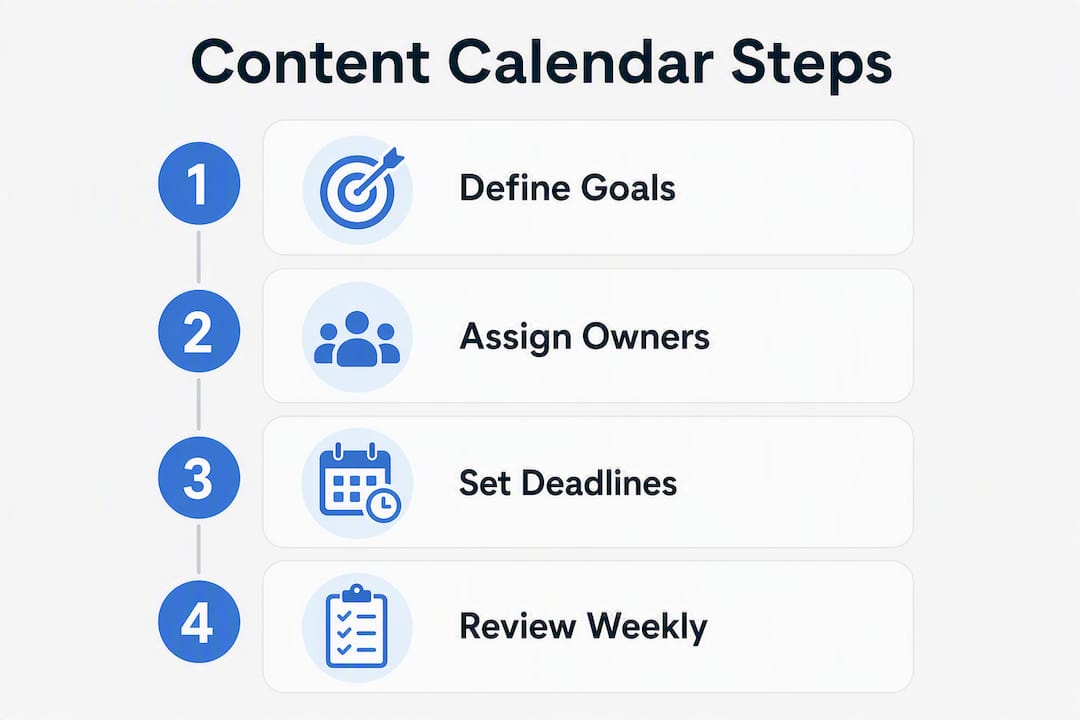
Build in this order: set pillars, choose channels, set cadence, fill four weeks, map production windows, then run a weekly review. Skipping to the tool before you have pillars is the most common reason calendars get abandoned.
-
Define your content pillars. Choose 3–5 core themes that map directly to your business goals. If a new content idea cannot map to a pillar, reject it or use it as a signal to re-evaluate your pillars. Pillar discipline prevents topical drift over time.
-
Choose your channels and formats. Pick the channels where your audience actually spends time, not the ones that feel aspirational. Each channel gets a format assignment (short video for Instagram Reels, long-form for the blog, plain-text for email).
-
Set your publishing cadence. Be honest about production capacity. One high-quality post per week beats five mediocre ones. You can always scale up after four weeks of real data.
-
Fill the next four weeks. Lock working titles, owners, and publish dates for the immediate four weeks. Rough out themes for weeks five through twelve. Effective managers lock production-ready titles only 4–6 weeks out and plan themes three months ahead. That split keeps the calendar flexible without leaving it vague.
-
Map production windows. Work backward from each publish date. Set a production start date, a draft deadline, and a review checkpoint. If the production window is shorter than the actual work required, that is a structural scheduling failure, not a bandwidth problem.
-
Reserve reactive slots. Keep one or two open slots per week for time-sensitive or opportunistic content. Store those ideas in a separate holding space so they do not displace your main plan.
-
Run a standing weekly review. A 30-minute weekly review is the single feature that keeps a calendar operational over months. Audit last week’s performance, confirm production status, and brief the next two weeks.
For your first planning session, lock these items before you leave the room: publish dates for the next four weeks, one owner per piece, and a production start date for anything due in the next ten days. Everything beyond four weeks can stay at the theme level.
Pro Tip: Batch content creation by format, not by date. Write all four blog intros in one sitting, then record all short videos in another. Teams report 30–40% time savings when batching content tasks this way.

What fields does every calendar template need?
A calendar without the right fields creates the same bottlenecks as no calendar at all. The table below covers the minimum required fields, why each one matters, and what the minimum input looks like.
| Field | Why it matters | Minimum input |
|---|---|---|
| Working title | Anchors the piece so everyone knows what is being made | A descriptive placeholder, not “Blog post #4” |
| Content pillar | Filters ideas and prevents topical drift | One of your 3–5 named pillars |
| Format | Sets production expectations and tool requirements | Blog, email, video, carousel, etc. |
| Channel | Determines distribution workflow and scheduling tool | One primary channel per row |
| Publish date | Creates accountability and drives backward scheduling | Specific date, not “end of month” |
| Production start date | Prevents last-minute scrambles | At least 5–7 business days before publish |
| Review date | Ensures quality control before scheduling | 2 business days before publish |
| Owner | Single-owner accountability prevents missed deadlines | One person’s name, never “team” |
| Status | Makes blockers visible at a glance | Not started / In progress / In review / Scheduled / Published |
| Distribution plan | Reminds the team how the piece gets promoted after publish | Email, social share, paid boost, repurpose |
| Target metric | Ties the piece to a measurable outcome | Clicks, opens, conversions, reach |
The single-owner rule deserves emphasis. “Team” as an owner means no one owns it. Assign one person who is accountable for the piece reaching Published status, even if others contribute.
Pro Tip: Lock titles for the next four weeks; use themes only for weeks five through twelve. Titles create commitment and reduce decision fatigue on production days. Themes give you room to respond to what performs.
Which tools work best for your content planning calendar?
The right tool depends on team size and how much automation you actually need. Starting in a spreadsheet and moving to a dedicated tool after four to eight weeks of real data is almost always the right call.

Google Sheets is the fastest starting point. Zero setup, shareable instantly, and flexible enough to hold every field in the table above. The limitation is that it does not send reminders, track task dependencies, or integrate with scheduling platforms natively. Use it when you are solo or when your team is fewer than three people and you need to move this week.
Notion suits solo creators and small teams who want a database-style calendar with linked views. You can build a master calendar database, filter by pillar or channel, and connect it to a project wiki. The Notion template marketplace has several content calendar templates you can duplicate in under five minutes. The trade-off: Notion requires more setup than a sheet, and new team members need onboarding time.
Asana fits cross-functional teams where content production involves multiple departments (design, legal review, paid media). Its timeline view maps production windows visually, and task dependencies prevent a piece from moving to “In review” before the draft is done. Asana’s content calendar template is a solid starting point for teams of five or more.
A quick matching guide:
- Solo creator: Google Sheets or Notion (free tier)
- Small team (2–5 people): Notion with a shared database, or Asana’s free plan
- Cross-functional or enterprise team: Asana, with integrations to your CMS and social scheduler
Store one master calendar and one monthly template. The master calendar holds every piece ever published. The monthly template is a clean copy you duplicate at the start of each planning cycle. Version the monthly template by date (e.g., “Content Calendar Template — March 2026”) so you can reference past structures without overwriting them.
For social-specific scheduling, a social media content creation calendar adds channel-specific fields like post copy, visual asset links, and hashtag sets that a general calendar often omits.
What are realistic production timelines by content format?
The most common scheduling failure is not missing a deadline. It is setting a production window that was never long enough to begin with. The table below gives realistic time estimates and recommended buffers by format.
| Format | Typical production time | Recommended buffer before publish |
|---|---|---|
| Long-form blog post (1,500+ words) | 4 hours | 5 business days |
| LinkedIn article or newsletter | 2–3 hours | 3 business days |
| Short-form video (60 seconds) | 3–5 hours (script + shoot + edit) | 4 business days |
| Email campaign | 2–4 hours | 3 business days |
| YouTube video (around 10 minutes) | 8 hours | 7 business days |
| Social carousel (5 slides) | 2–3 hours | 2 business days |
The batching vs. publishing cadence rule is straightforward: if you publish weekly, batch every two weeks. If you publish from monthly batches, batch three weeks ahead. The batching cycle must always outrun the publishing cycle. When it does not, one missed production day cascades into a missed publish date.
Sample solo creator weekly schedule:
- Monday (20 minutes): weekly planning ritual, confirm this week’s pieces, brief next week
- Tuesday/Wednesday: write and record
- Thursday: edit and design
- Friday: schedule and distribute
Sample small-team 4-week production cycle:
- Week 1: plan themes and assign briefs for weeks 3–4
- Week 2: draft all week 3 pieces; review week 2 pieces
- Week 3: publish week 3; draft week 4; begin week 5 briefs
- Week 4: publish week 4; run monthly performance review; plan next month’s themes
A 20-minute weekly planning ritual keeps solo creators and small teams on track without burning hours on process. The ritual is not optional; it is what separates a calendar that works in month three from one that gets abandoned in week four.
How do you track performance and update your calendar?
Track these metrics on a weekly basis, not monthly. Monthly reviews catch problems too late to fix them.
- Production completion rate: what percentage of scheduled pieces actually published on time this week?
- Publish consistency: how many weeks in a row have you hit your cadence target?
- Engagement per pillar: which of your 3–5 pillars drives the most clicks, shares, or replies?
- Email-specific metrics: open rate, click rate, and revenue per send for any email tied to a campaign
- Conversion metrics: for pieces tied to a product launch or campaign, track click-through to landing page and conversion rate
The weekly review runs in 30 minutes. Check production completion for the past week, confirm status on everything due in the next two weeks, and update the calendar based on what performed. If one pillar consistently underperforms, swap it or reduce its frequency. If a format takes twice as long as estimated, adjust the production window in the template so the next cycle is accurate.
Map metric outcomes to calendar changes directly. Lower engagement on a pillar means fewer slots, not more effort. A format that routinely misses its production window means the buffer was wrong, not the team. For content creation in digital marketing, the calendar is only as good as the feedback loop that updates it.
What mistakes kill a content schedule, and how do you avoid them?
Most calendars fail for the same handful of reasons. Here is what to watch for and how to fix each one fast.
Common mistakes:
- Assigning “team” as the owner instead of one named person
- Building the calendar in a tool before defining pillars and cadence
- Setting a publishing cadence that exceeds actual production capacity
- Planning titles twelve weeks out and locking them too early (kills flexibility)
- No buffer between batching and publishing, so one delay cascades
Pro Tip: Map your production windows before you commit to a cadence. If a blog post takes six hours and you have four hours of content production time per week, a weekly blog is not a realistic cadence. Set the cadence your production window can actually support, then scale up.
High-value corrections:
- Replace “team” with one person’s name in the owner field before the calendar goes live
- Use backward scheduling from every publish date: set production start, draft deadline, and review date first
- Lock only the next four weeks with titles; keep weeks five through twelve at the theme level
- Keep a reactive holding space (a separate tab or section) for time-sensitive ideas so they do not displace planned pieces
- Run the 30-minute weekly review without exception. Skipping it once is how calendars degrade.
How do you copy a starter template and use it in under 60 minutes?
Start simple: a spreadsheet with date, topic, channel, owner, and status is better than an overbuilt system that never gets used. Add complexity only after four to eight weeks of real data.
To set up your starter Google Sheet in under 60 minutes:
- Open a new Google Sheet and name it “Content Calendar — [Month] [Year]”
- Add these column headers in row 1: Publish Date / Working Title / Pillar / Format / Channel / Owner / Status / Production Start / Review Date / Target Metric
- Fill in the next four weeks of rows with working titles and owners
- Share it with your team (Editor access for contributors, Viewer for stakeholders)
- Duplicate the sheet monthly; keep one master tab that never gets edited
Example of how one anchor piece maps across a month:
A 1,500-word blog post on a core pillar topic becomes: one LinkedIn article (condensed version), three short-form social posts (one insight per post), one email newsletter section, and one short video script. That is five pieces from one production session. Map all six rows in the calendar with the same pillar tag and a note in the distribution field linking the derivatives back to the anchor.
Pro Tip: Connect your Google Sheet to a scheduling tool via CSV export or a native integration (Buffer, Later, and Hootsuite all accept CSV imports). This eliminates the manual copy-paste step between your calendar and your scheduler, which is where most publishing errors happen.
For ecommerce email content creation, the anchor-to-derivative model works especially well: one campaign brief feeds the email flow, the social teaser, and the post-purchase follow-up sequence from a single planning session.
Key Takeaways
A working content creation schedule requires four locked weeks, single-owner accountability, production windows mapped backward from publish dates, and a standing 30-minute weekly review to stay operational.
| Point | Details |
|---|---|
| Lock four weeks immediately | Fill the next four weeks with working titles, owners, and publish dates before anything else. |
| Single-owner rule | Assign exactly one named person per piece; “team” as owner means no one owns it. |
| Batch ahead of your publish cycle | Batch every two weeks if you publish weekly; batching must always outrun publishing. |
| Run a weekly review | A 30-minute standing review keeps the calendar accurate and prevents cascading delays. |
| Take-action for execution at scale | Take-action builds and manages content calendars, email flows, and automation for ecommerce brands that need consistent output without adding headcount. |
The calendar is the easy part
Every marketing team I have observed that struggles with content consistency has the same problem: the calendar exists, but the production system behind it does not. The calendar is a visibility tool. It shows you what needs to happen. The production system, the batching rhythm, the backward-scheduled windows, the single owner, the weekly review, is what makes the calendar mean something.
The conventional advice is to find the right tool. Notion versus Asana versus a spreadsheet. That debate misses the point entirely. A spreadsheet with real owners and real production windows outperforms a beautifully designed Notion database where every piece is assigned to “team” and the review date column is empty.
What actually works for ecommerce and retention-focused brands is the anchor-to-derivative model. One long-form piece, planned with enough lead time to repurpose it into email, social, and video before the publish date, reduces the per-piece cost of content dramatically. The calendar makes that repurposing visible. Without it, derivatives get skipped because no one remembered to schedule them.
The other thing most guides understate: the weekly review is not a nice-to-have. It is the mechanism that keeps the calendar honest. Skip it twice and the calendar becomes a historical record of what you planned, not a live production tool.
When your team needs more than a calendar
If your team has missed the same publish dates three weeks in a row, or you are trying to coordinate content across email, social, and paid channels without a dedicated operations person, a calendar alone will not fix it.
Take-action builds and manages the full content production system for ecommerce brands: calendar architecture, email flow setup, campaign sequencing, and the weekly review rhythm that keeps it running. The difference from a freelancer or a DIY setup is execution continuity. You get a team that owns the calendar, the production windows, and the Klaviyo flows, without hiring a full-time content operations manager.
If you are spending more time managing the calendar than creating content, that is the tipping point. Book a strategy audit with Take-action to see where the production gaps are and what a managed calendar engagement looks like for your brand.
Sources, templates, and further reading
The claims and cadence rules in this guide draw from the following sources. Template links are included where available.
- How to Create a Content Calendar (Step-by-Step) — Scale Growth Digital: source for the 2–3x consistency finding, the 85% AI adoption figure, the 30–40% batching time savings, and the single-owner accountability rule.
- Notion template marketplace: ready-made content calendar templates for solo creators and small teams.
- Asana content calendar template: cross-functional team template with timeline view and task dependencies.