
Email Sequences: The Complete Playbook for 2026
An email sequence is an automated, goal-driven series of messages sent to a specific segment in a defined order, triggered by behavior, time, or lifecycle stage. If you’re starting from scratch, build a 3–5 email sequence tied to one measurable KPI before adding complexity. That single constraint forces clarity and makes your first test meaningful.
Two benchmarks worth knowing before you write a single subject line:
- Top-performing sales sequences hit reply rates above 10.7%, while the average sits around 3%. The gap is almost entirely explained by personalization and timing, not volume.
- Roughly 70% of outreach responses come from emails 2–4, not email 1. Sending once and giving up is the most common reason sequences fail.
Key Takeaways
Effective email sequences are built on behavioral triggers, specific segmentation, and sequence-level measurement — not on sending volume alone.
| Point | Details |
|---|---|
| Start with 3–5 emails | Most sequence types perform best at 3–5 emails; split longer programs into separate flows with clear triggers. |
| Cadence drives results | Abandoned cart: 1 hour, 24 hours, 72 hours. Cold outreach: Day 1, 4, 8, 14. Welcome: Day 0, 1, 3, 7. |
| Measure at the flow level | Track reply rate for sales sequences and conversion/activation rate for marketing and onboarding flows. |
| Deliverability is foundational | Verify SPF, DKIM, and DMARC; warm up new domains; clean lists before launch to protect sender reputation. |
| Take-action for Klaviyo setup | Take-action builds behavior-triggered Klaviyo flows for ecommerce brands focused on measurable retention and revenue growth. |
Table of Contents
- What email sequences are and how they differ from drip campaigns
- Common sequence types and when to use each
- How to plan and write a sequence that actually converts
- Recommended cadence, timing, and performance benchmarks
- Six practical sequence templates you can copy and adapt
- How to set up and automate sequences in popular tools
- Which metrics to track and how to optimize over time
- Common mistakes and red flags to watch for
- How Take-action approaches email sequences
- What actually matters when you’re building sequences
- Take-action: email sequences built for measurable growth
- Frequently asked questions about email sequences
- Sources
What email sequences are and how they differ from drip campaigns
A one-off marketing email is a broadcast: one message, one moment, one audience. An email sequence is a conversation with a structure. Each message builds on the last, and the whole series is designed to move a contact from one state (unaware, unconverted, disengaged) to another (activated, purchased, retained).
The confusion between sequences and drip campaigns is understandable because the terms overlap in most tools. The practical distinction is this: a drip campaign is time-based, sending messages on a fixed schedule regardless of what the recipient does. A sequence, in its more sophisticated form, is behavior-triggered and can branch based on opens, clicks, replies, or purchases. Someone who clicks a pricing link in email 2 might skip email 3 and jump straight to a demo-booking prompt. That branching is what separates a sequence from a drip.
The most common mistake marketers make is treating a sequence like a drip. They set a fixed schedule, write five emails, and wonder why engagement drops after email 2. Behavior-triggered branching is what keeps a sequence relevant, and relevant sequences convert.
Where each approach fits best:
- One-off emails: Announcements, promotions, newsletters, product launches. No follow-up logic needed.
- Drip campaigns: Long-term nurture where timing matters more than behavior (weekly educational content, monthly check-ins).
- Behavior-triggered sequences: Sales outreach, onboarding, abandoned cart, re-engagement. Any scenario where what the contact does should change what they receive next.
Common sequence types and when to use each
Matching the sequence type to the business goal is the first decision, and it determines everything downstream: length, tone, primary KPI, and the right tool configuration.
The main sequence types:
-
Welcome sequence — Best for new subscribers or customers who just opted in. Goal: set expectations, deliver the promised value, and drive a first meaningful action (a purchase, a profile completion, a content download). Primary KPI: click-through rate on the first CTA.
-
Onboarding / trial conversion sequence — Best for SaaS products and subscription services. Goal: get users to the “aha moment” before the trial expires. Primary KPI: feature activation rate or trial-to-paid conversion.
-
Abandoned cart sequence — Best for ecommerce brands. Goal: recover revenue from contacts who added items but didn’t complete checkout. Primary KPI: recovered purchase rate. Cadence benchmarks suggest sending at 1 hour, 24 hours, and 72 hours after abandonment.
-
Sales outreach sequence — Best for B2B teams prospecting cold or warm leads. Goal: book a meeting or start a conversation. Primary KPI: reply rate. Keep this to 3 emails before switching to multi-channel contact.
-
Re-engagement sequence — Best for lists with segments that haven’t opened or clicked in 60–90 days. Goal: reactivate or cleanly remove disengaged contacts. Primary KPI: reactivation rate and list health improvement.
-
Post-purchase / upsell sequence — Best for ecommerce and subscription brands after a first order. Goal: drive repeat purchase, cross-sell a complementary product, or upgrade the customer. Primary KPI: repeat purchase rate. Cross-sell strategies work especially well when the follow-up email references the specific product purchased.
-
Post-support follow-up sequence — Best for customer success and support teams. Goal: confirm resolution, gather satisfaction data, and surface upsell or referral opportunities. Primary KPI: CSAT score and referral conversion.
-
Webinar / event follow-up sequence — Best for demand-gen and content marketing teams. Goal: convert attendees and no-shows into pipeline. Primary KPI: demo or consultation booking rate. Revenue Grid maps seven scenario-based sequences including webinar follow-up with specific timing and messaging patterns for each.
How to plan and write a sequence that actually converts
Most sequences underperform because they were written before the strategy was clear. The planning step is not optional.
Step 1: Define the goal, segment, and single CTA. Every sequence needs one measurable outcome. “Nurture leads” is not a goal. “Book a 20-minute discovery call with leads who downloaded the pricing guide” is. Once the goal is specific, the segment and CTA write themselves.
Step 2: Map the journey before writing. Sketch one line per email: what does this email do, and what should the reader do next? A five-email onboarding sequence might look like: (1) welcome + first action, (2) feature highlight + tutorial link, (3) social proof + upgrade prompt, (4) check-in if no activation, (5) breakup / support offer. Mapping the journey first prevents the common problem of emails that repeat the same message with different subject lines.
Step 3: Write each email with this checklist:
- Subject line: Use a formula that matches the email’s purpose. Curiosity (“You haven’t done this yet”), direct benefit (“Your cart is waiting”), or personal (“Quick question, [First Name]”). Test two variants per email.
- First line: Never open with “I hope this email finds you well.” Reference something specific: the product they viewed, the webinar they attended, the trial day they’re on.
- Body length: 75–150 words for cold outreach. 150–300 words for onboarding and nurture. Longer only when delivering genuine educational value.
- Single CTA: One link, one ask. Two CTAs cut conversion because they create a decision.
- Close: For sales outreach, a reply-oriented close (“Does Thursday at 2 PM work?”) outperforms a link-heavy one.
Step 4: Decide what to test first. Subject line, then CTA, then send time. Test one variable at a time with a minimum of 200 contacts per variant before drawing conclusions.
Pro Tip: Pull your sequence ideas from real sales and support conversations. The questions prospects ask in week one are the exact objections your sequence should preemptively answer. Convert those recurring questions into proactive email steps and you’ll reduce support volume while improving activation.
Recommended cadence, timing, and performance benchmarks
Cadence is where most marketers either over-send (damaging deliverability) or under-send (losing momentum). The right answer depends on the sequence type.
Cadence templates by sequence type:
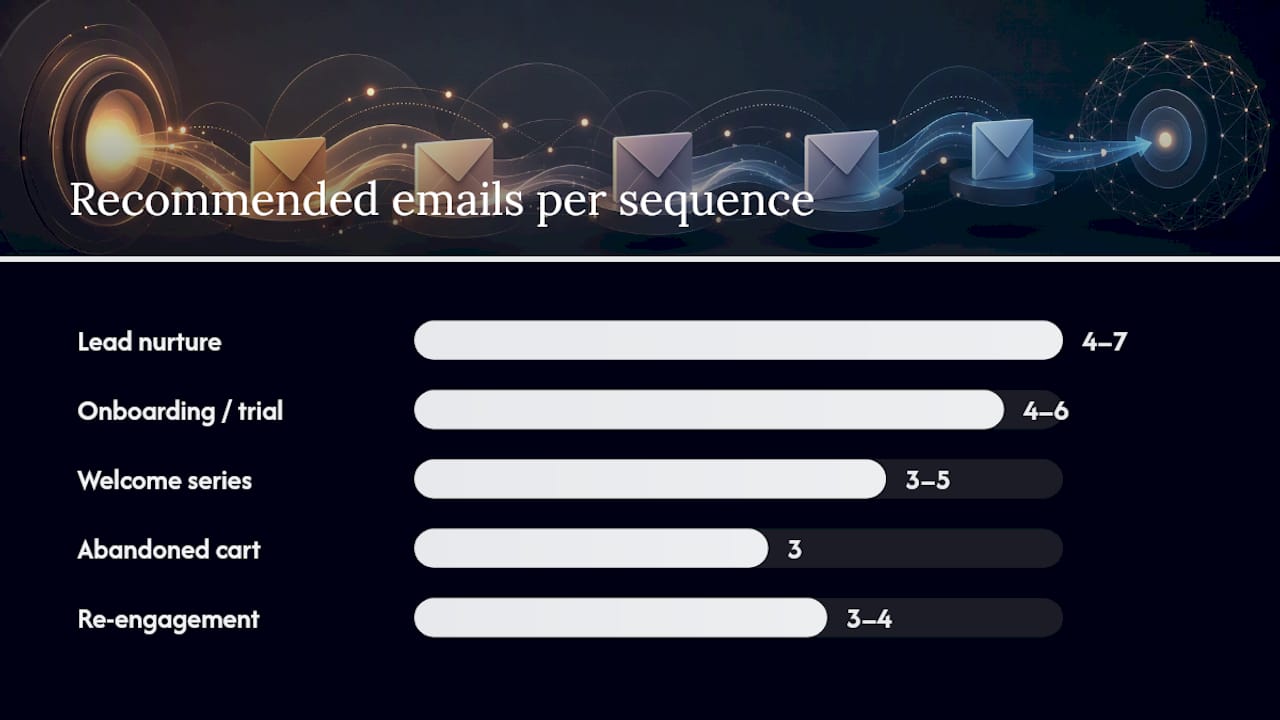
| Sequence Type | Recommended Emails | Cadence | Primary KPI |
|---|---|---|---|
| Welcome series | 3–5 | Day 0, Day 1, Day 3, Day 7 | Click-through rate |
| Onboarding / trial | 4–6 | Day 0, Day 2, Day 5, Day 10, Day 14 | Activation / trial-to-paid |
| Abandoned cart | 3 | 1 hour, 24 hours, 72 hours | Recovered purchase rate |
| Cold sales outreach | 3–4 | Day 1, Day 4, Day 8, Day 14 | Reply rate |
| Lead nurture | 4–7 | Every 3–7 days | Pipeline conversion |
| Re-engagement | 3–4 | Day 0, Day 7, Day 14, Day 21 | Reactivation rate |
| Post-purchase / upsell | 3–4 | Day 1, Day 7, Day 21 | Repeat purchase rate |
For cold outreach specifically, a 6-step framework running Day 1, Day 4, Day 8, Day 14, Day 21, and Day 28 with an explicit breakup email at the end gives SDRs a repeatable structure that closes the loop cleanly.
Timing within the day: Tuesday through Thursday, 9–11 AM in the recipient’s local timezone, consistently outperforms Monday and Friday sends for B2B sequences. For ecommerce, evening sends (7–9 PM) tend to perform better for promotional and cart-recovery emails. Always send in the recipient’s timezone when your tool supports it.
Realistic benchmarks to set expectations:
- Average cold outreach reply rate: ~3%
- Top-performing cold outreach reply rate: 10.7%+
- Welcome email open rates: typically 50–60% for the first email, dropping to 30–40% by email 3
- Abandoned cart recovery rate: 5–15% across the 3-email sequence
- Re-engagement reactivation: 10–25% of the disengaged segment
For broader open rate benchmarks by industry, the range varies significantly.
Six practical sequence templates you can copy and adapt
These templates are starting points. Every token in brackets is a personalization field. Swap the CTA to match your goal.
1. Welcome sequence (3 emails)
Email 1 — Day 0 Subject line options: “Welcome to [Brand] — here’s where to start” / “You’re in. Here’s what happens next.” / “One thing to do right now, [First Name]” Body: Deliver the promised value immediately (discount, resource, access). State what the sequence will cover. Single CTA: complete profile / make first purchase / explore the dashboard.
Email 2 — Day 1 Subject line options: “The one thing most [Brand] members miss” / “Did you see this, [First Name]?” / “Your next step with [Brand]” Body: Highlight one key feature or benefit. Add a short social proof line (“Over 12,000 brands use this to…”). CTA: tutorial link or product category.
Email 3 — Day 3 Subject line options: “Still here? Good.” / “A quick check-in from [Brand]” / “Here’s what’s waiting for you” Body: Address the most common first-week objection or question. Offer support. CTA: reply to this email or book a call.
2. Sales outreach sequence (4 emails)

Email 1 — Day 1: Personalized opener referencing their company or role. One specific pain point. One ask: a 15-minute call. No attachments.
Email 2 — Day 4: Reference email 1. Add one piece of relevant social proof or a short case outcome. Same ask, lower friction (“Even a quick ‘not now’ helps me”).
Email 3 — Day 8: Shift the angle. Offer a resource (a guide, a benchmark, a relevant article) with no ask attached. Build goodwill.
Email 4 — Day 14 (breakup): “I won’t keep following up after this. If the timing is ever right, [link]. Otherwise, no hard feelings.” This email often gets the highest reply rate of the sequence.
3. Abandoned cart sequence (3 emails)
Email 1 — 1 hour: “[First Name], you left something behind.” Show the product image. Single CTA: return to cart. No discount yet.
CTA: complete purchase.
Email 3 — 72 hours: Final reminder. If no purchase, offer an alternative (different size, related product) or ask what stopped them. CTA: reply or return to cart.
For ecommerce personalized templates, the product image in email 1 alone can lift click-through rates meaningfully compared to text-only cart reminders.
4. Onboarding / trial conversion sequence (5 emails)
Day 0: Welcome + single first action. Day 2: Feature spotlight + tutorial. Day 5: Social proof + upgrade prompt. Day 10: Check-in for non-activators (behavior-triggered). Day 14: Trial expiry warning + final offer.
5. Re-engagement sequence (3 emails)
Email 1 — Day 0: “We miss you, [First Name].” Acknowledge the silence. Offer something new or a reminder of value. CTA: click to re-engage.
Email 2 — Day 7: Different angle. Ask a direct question: “Is this still relevant for you?” Reply-oriented CTA.
Email 3 — Day 14: Breakup email. “We’ll remove you from this list unless you’d like to stay.” This protects deliverability and often reactivates a surprising share of contacts.
6. Post-support follow-up sequence (2 emails)
Email 1 — 24 hours after ticket close: Confirm resolution. Ask one satisfaction question (a single rating link). CTA: rate your experience.
Email 2 — Day 7: If rated positively, ask for a referral or review. If no response, offer additional help. Keep it short.
How to set up and automate sequences in popular tools
The setup process is similar across platforms, but the terminology and pitfalls differ.
Universal implementation checklist:
- Create and verify your sending domain (SPF, DKIM, DMARC records confirmed).
- Build and clean your segment before creating the sequence.
- Write and save email templates with personalization tokens tested.
- Set enrollment triggers (form submission, purchase event, tag applied, date-based).
- Configure exit conditions (reply received, purchase made, tag removed).
- QA the full sequence with a test contact before activating.
- Soft-launch to 10–20% of the segment and monitor deliverability for 48 hours.
Mailchimp: Uses “Customer Journeys” for automation. Enrollment triggers include form signup, tag, API event, or date. Personalization tokens use *|FNAME|* syntax. Common pitfall: the default “Send at subscriber’s local time” option requires timezone data in the contact profile — if that field is empty, Mailchimp sends at your account timezone instead. Always audit timezone data before activating.
HubSpot: Sequences live under Sales > Sequences (for 1:1 sales outreach) and Workflows (for marketing automation). Sales Sequences enroll individual contacts and pause automatically when a contact replies. Workflows handle bulk behavioral triggers. Personalization tokens pull from contact and company properties. Common pitfall: Sales Sequences require a connected personal inbox (Gmail or Outlook), not a shared marketing address. Mixing the two creates deliverability and attribution problems.
Klaviyo: Flows are the equivalent of sequences. Trigger types include metric (e.g., “Placed Order”), list/segment membership, and date. Klaviyo’s conditional splits let you branch based on any property or event, making it the strongest tool for ecommerce behavior-triggered sequences. For Klaviyo personalization strategies, dynamic blocks that show different content based on purchase history or predicted LTV are particularly effective for post-purchase and upsell flows. Common pitfall: flow filters and trigger filters are different things in Klaviyo. A trigger filter controls who enters the flow; a flow filter controls who receives each email inside it. Confusing the two causes contacts to enter but skip emails unexpectedly.
Zapier + Shopify integrations: Shopify fires events (checkout abandoned, order placed, customer created) that Zapier can catch and use to enroll contacts in sequences in Mailchimp, HubSpot, or Klaviyo. A typical abandoned-cart trigger: Shopify “Checkout Abandoned” → Zapier delay (55 minutes) → Mailchimp “Add/Update Subscriber” with tag “abandoned-cart” → Mailchimp Journey enrolls on that tag. For Klaviyo, the native Shopify integration handles this without Zapier, which is one reason Klaviyo dominates ecommerce email automation.
Reply routing and CRM handoffs: Configure your sequence to exit a contact when a reply is detected. In HubSpot, this is automatic for Sales Sequences. In Mailchimp and Klaviyo, set a tag or property update on reply (via Zapier or a webhook) that removes the contact from the active flow. Route replies to the owning sales rep or support agent via CRM task creation in HubSpot or a Slack/email notification via Zapier. Never let a replied contact continue receiving automated sequence emails.
Which metrics to track and how to optimize over time
Measure at the sequence level first, then drill into individual emails.
Metrics by sequence type:
| Metric | Sales Outreach | Welcome / Onboarding | Abandoned Cart | Re-engagement |
|---|---|---|---|---|
| Primary | Reply rate | Activation / click rate | Recovered purchase rate | Reactivation rate |
| Secondary | Meeting booked | Feature adoption | Revenue recovered | Unsubscribe rate |
| Watch | Unsubscribe rate | Unsubscribe rate | Spam complaints | Spam complaints |
| Deliverability signal | Bounce rate | Bounce rate | Bounce rate | Bounce rate |
Measuring at the flow level rather than per email gives you a cleaner picture of whether the sequence is working as a system.
A/B test priority order:
- Subject line first. It has the highest leverage and the fastest signal. Test curiosity vs. direct benefit vs. personalized opener.
- CTA second. Test the button copy, the placement (above vs. below the fold), and the ask itself (book a call vs. reply to this email).
- Send time third. Test morning vs. afternoon, or Tuesday vs. Thursday, with a minimum 200-contact split.
- Format last. Plain text vs. HTML, short vs. long body, single image vs. no image.
Deliverability checklist:
- SPF, DKIM, and DMARC records verified for every sending domain.
- New domains warmed up over 2–4 weeks before scaling volume.
- Lists verified and cleaned before launch (remove invalid addresses, spam traps).
- Monitor bounce rate (keep hard bounces below 2%) and spam complaint rate (keep below 0.1%).
- An unsubscribe spike after a specific email in a sequence usually signals a relevance mismatch, not a deliverability problem. Audit that email’s content and CTA before assuming a technical issue.
For email segmentation strategies that feed cleaner lists into sequences, segmenting by purchase history, engagement tier, and lifecycle stage before enrollment consistently improves deliverability and conversion.
Common mistakes and red flags to watch for
Red flags in sequence design:
- No clear CTA per email. If you can’t state the single action you want the reader to take in one sentence, the email isn’t ready to send.
- Sequences longer than 8 emails without a logical break point. Long sequences feel like a commitment to recipients. Split them into two shorter sequences with a clear transition trigger.
- No personalization beyond first name. First-name tokens are table stakes. Reference the product viewed, the content downloaded, or the trial day the contact is on.
- Mixing transactional and promotional triggers in one flow. A post-purchase transactional confirmation followed by a promotional upsell in the same flow creates compliance risk and confuses recipients about what they signed up for.
- No exit condition. A contact who purchases mid-sequence should exit the abandoned-cart flow immediately. Missing exit conditions are the fastest way to damage trust.
Quick fixes:
- For sequences with no clear CTA: write the CTA first, then write the email backward from it.
- For overly long sequences: find the natural break point (usually after a key action or milestone) and split into two flows with a re-enrollment trigger.
- For low personalization: add one behavioral token beyond first name. The product image in an abandoned-cart email, the feature name in an onboarding email, or the company name in a sales outreach email each lift engagement.
- For mixed triggers: separate transactional and promotional flows at the trigger level, not just the content level.
For a deeper look at common email marketing mistakes that affect ROI, the most damaging ones are almost always structural rather than copy-related.
How Take-action approaches email sequences
Take-action builds sequences goal-first. Before writing a single email, the team maps the business objective, the segment, and the behavioral triggers that define the journey. That planning step prevents the most common failure mode: sequences that are technically functional but strategically misaligned.
The agency’s framework runs in four phases: goal-first planning, behavior-triggered branching, iterative testing, and deliverability-first setup. For ecommerce clients, this typically means starting with three foundational flows (welcome, abandoned cart, post-purchase) before layering in re-engagement and upsell sequences. The sequencing order matters because each flow builds the behavioral data that makes the next one more precise.
When to bring in an agency:
- Your sequences are live but you can’t identify why conversion drops at a specific email.
- You’re managing more than three active flows and CRM handoffs are breaking down.
- You’re scaling ad spend and need email retention to offset acquisition costs.
- You want Klaviyo flows set up correctly from the start, not rebuilt after a deliverability problem.
What actually matters when you’re building sequences
The conventional wisdom says “more emails, more touchpoints, more chances to convert.” The data says something different. About 70% of outreach responses come from emails 2–4, which means the first email is rarely the converter. It’s the setup. The sequence is the strategy.
What most guides understate is the cost of a poorly structured sequence. A sequence that sends irrelevant emails to disengaged contacts doesn’t just waste budget. It trains your audience to ignore you, damages sender reputation, and makes every future campaign harder to land in the inbox. The deliverability damage from a bad sequence compounds over months.
The counterintuitive move is to make your sequences shorter and more specific, not longer and more comprehensive. A 3-email abandoned-cart sequence that references the exact product, sends at the right intervals, and exits on purchase will outperform a 7-email “nurture” sequence that treats every non-buyer the same way. Specificity is the variable that moves the needle, and specificity comes from segmentation and behavioral triggers, not from writing more emails.
One thing worth doing this week: pull your last 20 support tickets or sales call notes and look for the question that appears most often in the first week. That question is your next sequence email. Convert the answer into a proactive message, add it to your onboarding flow, and measure whether support volume on that topic drops. It usually does.
Take-action: email sequences built for measurable growth
Most ecommerce brands set up their first email flows once and never revisit them. Revenue leaks from sequences that don’t exit on purchase, don’t branch on behavior, and haven’t been tested since launch.
Take-action builds and manages email sequences in Klaviyo that are designed to convert from day one and improve over time. The agency handles everything from segment creation and flow architecture to copy, A/B testing, and deliverability monitoring. Clients get sequences that respond to what contacts actually do, not just when they signed up.
If your welcome, abandoned-cart, or post-purchase flows aren’t hitting the benchmarks in this guide, or if you’re starting from scratch and want them built correctly the first time, Take-action is the direct path. Book a strategy call to see where your current sequences are leaving revenue on the table.
Frequently asked questions about email sequences
How many emails should a sequence have? Most sequences perform best at 3–5 emails. Cold outreach should stop at 3–4 before switching to multi-channel contact. If a program genuinely needs more than 8 emails, split it into two separate sequences with a clear re-enrollment trigger between them.
What’s the difference between an email sequence and a drip campaign? A drip campaign sends messages on a fixed time schedule regardless of recipient behavior. A sequence, in its most effective form, branches based on what the contact does: opens, clicks, replies, or purchases. The behavioral branching is what makes sequences more relevant and more likely to convert.
What is the best tool for email sequences? For ecommerce, Klaviyo is the strongest option because its native Shopify integration and behavioral triggers are purpose-built for purchase-event flows. HubSpot is the best choice for B2B sales sequences that need CRM integration and automatic reply detection. Mailchimp works well for smaller lists and simpler welcome or nurture flows.
How do I measure whether a sequence is working? Measure at the sequence level first. For abandoned cart, track recovered purchase rate. For onboarding, track activation rate or trial-to-paid conversion. Open rate alone tells you very little about whether a sequence is achieving its goal.
When should I hire an agency to manage email sequences? When you’re managing more than three active flows, when CRM handoffs are breaking down, or when you’re scaling ad spend and need email retention to offset acquisition costs. Take-action specializes in Klaviyo flow architecture for ecommerce brands at exactly this stage.
How do I avoid damaging deliverability with sequences? Verify SPF, DKIM, and DMARC before sending. Warm up new domains over 2–4 weeks. Clean your list before enrollment. Set exit conditions so contacts who purchase or reply stop receiving automated emails.
Sources
The benchmarks and frameworks in this guide draw from the following sources:
- Sales email sequences: The complete guide to building pipeline in 2026
- Email Sequences: Best Practices, Templates & Examples (2026)
- Email Marketing Sequence Playbook: Benchmarks & Cadence (2026)
- Sales Email Sequences: 7 Proven Examples, Templates & Timing Guide
- Sales Email Sequence: A 6-Step Outreach Flow With Templates (2026) | Serif
Take-action blog resources for deeper implementation: