

Improve Email Open Rates: A Practical Guide for Marketers
Fix deliverability first, then relevance, then creative. That’s the sequence. If your emails aren’t reaching the inbox, no subject line will save them. If they’re reaching the inbox but going to the wrong people, even a great subject line won’t move the number. The fastest path to better open rates runs through three checkpoints: verify your authentication (SPF, DKIM, DMARC), suppress inactive addresses, and send your next campaign to your most engaged segment only.
Your 24–72 hour action checklist:
- Confirm SPF, DKIM, and DMARC are configured and aligned on your sending domain
- Suppress or remove hard bounces and addresses with no opens in 90+ days
- Test your next send on a 14–30 day engaged segment, not your full list
- Rewrite your subject line and preview text as a pair (subject creates interest, preview resolves it)
- Run a single-variable A/B test on subject line only, keeping everything else constant
The one-line verdict: Inbox placement is the floor. Segmentation and subject lines are the ceiling. Fix the floor before you paint the ceiling.
Healthy open rate benchmarks for engaged lists run roughly 25%–40% depending on industry and list quality. If you’re below that range, the sections below will show you exactly where to look first.
Table of Contents
- How to improve open rates: start with a diagnosis
- Deliverability checklist: what to fix before you touch the subject line
- What makes a subject line, preview text, and sender name actually work
- How segmentation makes every send more relevant
- Send timing and cadence: finding what works for your audience
- A/B testing: how to run clean tests and read the results
- Mobile and accessibility: quick checks that remove friction
- Re-engagement flows and list hygiene: when to prune and when to try again
- Subject-line formulas and preview-text templates you can copy
- How Take-action prioritizes fixes and measures impact
- Key Takeaways
- The fix most teams skip
- What Take-action can do for your email program
- Useful sources and tools for further reading
How to improve open rates: start with a diagnosis
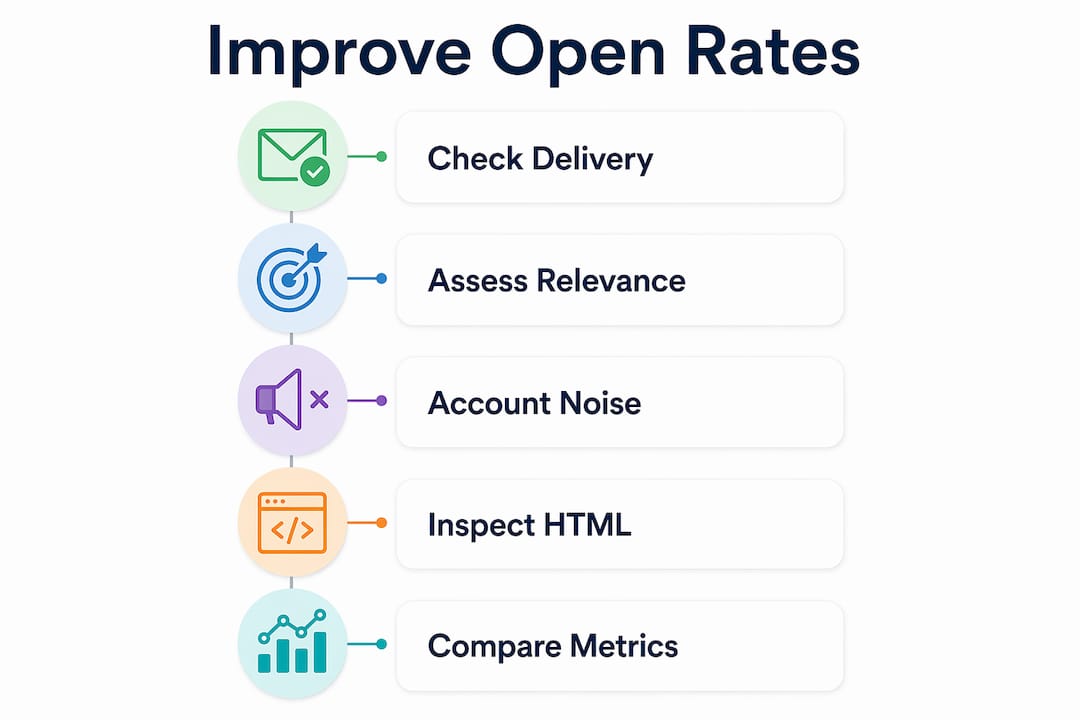
Before you rewrite a single subject line, figure out which layer is actually broken. Low opens have three possible causes: delivery failure, relevance failure, or measurement distortion. They require completely different fixes.
Start with delivery signals. Pull your last five sends and check bounce rate, complaint rate, and inbox placement. If your bounce rate is climbing or your complaint rate is above 0.1%, you have a reputation problem, not a creative problem. Authentication failures or a weak DMARC policy can cause mail to be filtered before the subject line ever gets seen.
If delivery looks healthy, evaluate relevance. Compare open rates by segment. If your 14-day engaged segment is opening at 40% and your full list is at 18%, the gap is a segmentation problem. Your message is reaching people who’ve already stopped caring.
Account for measurement noise. Apple Mail Privacy Protection preloads tracking pixels, which means an “open” can be recorded without anyone actually reading your message. Open rates are directional, not definitive. Use clicks, conversions, and inbox placement as your primary decision signals. When opens spike without a corresponding lift in clicks, MPP inflation is the likely culprit.
One quick check many teams miss: inspect your campaign HTML size. Gmail clips messages over 102 KB, which hides the tracking pixel and causes real opens to go unrecorded. A sudden drop in opens after a design refresh is often a file-size problem, not an audience problem.
Pro Tip: Compare your last five sends side by side: open rate, CTR, and complaint rate. A pattern of flat CTR alongside rising opens usually signals MPP inflation. A pattern of rising complaints alongside falling opens points to a list-health or relevance issue.
Deliverability checklist: what to fix before you touch the subject line
Technical infrastructure is the primary gatekeeper. SPF, DKIM, and DMARC are not optional extras. Unauthenticated emails face a significantly higher risk of rejection before they ever reach a subscriber’s inbox.
Authentication basics:
- SPF confirms your sending source is authorized to send on behalf of your domain
- DKIM adds a cryptographic signature so receiving servers can verify the message wasn’t altered in transit
- DMARC tells mailbox providers what to do when SPF or DKIM checks fail; set it to at least
p=quarantineonce you’ve confirmed your sending sources are aligned
Beyond authentication, list hygiene and authentication are the two highest-impact, medium-effort fixes available. Remove hard bounces immediately. Suppress repeated soft bounces after three to five failures. Implement a sunset policy for subscribers who haven’t opened in 90–180 days.
For new domains or lists that have gone cold, use a phased warm-up. Start sending only to your 14-day engaged segment for at least two weeks, then expand to 30-day engagers, then progressively to larger windows. Blasting a cold list from a new domain is one of the fastest ways to tank a sender reputation permanently.
Gmail annotations, when implemented correctly, can provide a measurable lift. GetResponse reports a weighted average uplift of around +5.6% when Gmail annotations are used, which is a meaningful gain for promotional sends.
| Deliverability check | Target range | Where to check |
|---|---|---|
| Bounce rate | Below 2% | ESP dashboard |
| Complaint rate | Below 0.1% | Google Postmaster Tools |
| Inbox placement rate | Above 90% | MXToolbox, GlockApps, or seed tests |
| DMARC policy | p=quarantine or p=reject |
DNS record lookup |
| Message size | Below 102 KB | Browser dev tools or Litmus |
| Hard bounce removal | Immediate | ESP suppression list |
What makes a subject line, preview text, and sender name actually work
The inbox trio works in order: sender name first, subject line second, preview text third. Subscribers decide whether to open based on all three in under two seconds, usually on a phone screen.

Sender name: Use something recognizable. “Jenny at Bloom Co.” outperforms “noreply@bloomco.com” every time. If your brand is well known, the brand name alone works. If it isn’t, a person-plus-brand format builds familiarity faster. Consistency matters more than cleverness here. Changing your sender name frequently trains subscribers to distrust the inbox signal.
Subject line rules that hold up across industries:
- Front-load the value. Put the most important word in the first three words, because mobile truncates everything after roughly 40–50 characters
- Personalization works when it adds context, not just a first name. “Your order from Tuesday” beats “Hey [First Name]!” every time
- Avoid ALL CAPS, excessive punctuation, and emoji stacks. One emoji, placed deliberately, can work. Three in a row reads as noise
- Specificity beats abstraction. “Cut your onboarding time in half” is easier to act on than “Exciting news inside”
Preview text is the most underused real estate in email. It should complete the subject line’s promise, not repeat it. If the subject line creates curiosity, the preview text should resolve just enough of it to earn the open. If your preview text is blank, your ESP will pull the first line of your email body, which is often an unsubscribe link or an image alt tag.
Pro Tip: Write your subject line and preview text as a pair before you write the email body. If they don’t work together as a headline and subheadline, the email isn’t ready to send.
Quick dos and don’ts:
- Do: “Last chance: your cart expires tonight” + preview “Three items, one still in stock”
- Don’t: “Don’t miss out!!!” + preview “Click here to view this email in your browser”
- Do: “A question about your Q3 hiring” + preview “Noticed you’re scaling the sales team”
- Don’t: “HUGE SALE ENDS SOON” + preview “HUGE SALE ENDS SOON” (repeated subject)
How segmentation makes every send more relevant
Segmentation is the strongest long-term lever for improving open rates. Behavioral and preference-based segments consistently outperform batch-and-blast approaches. The reason is simple: a message written for a specific group feels like it was written for the reader. A message written for everyone feels like it was written for no one.
Start with five segments that map directly to business goals:
- 14–30 day engagers: your healthiest audience; use for new campaign tests
- Recent buyers (0–60 days): high intent, ready for cross-sell or loyalty messaging
- Cart abandoners: triggered by behavior, not calendar; welcome and lifecycle emails consistently outperform broadcast campaigns on both open rate and revenue per recipient
- Topic/category preference: based on browse or purchase history
- Geographic or timezone groups: relevant for time-sensitive sends
Behavioral segmentation is where the real gains are. If someone browsed your skincare line three times this week, a subject line referencing skincare is more likely to earn an open than a generic promotional blast. For beauty and wellness brands specifically, retention-focused segmentation by product category and purchase frequency tends to produce the sharpest open-rate lifts.
Pro Tip: Don’t over-segment before you have data. Three to five clean segments with enough volume to run meaningful tests will outperform fifteen micro-segments that are too small to reach statistical significance.
Segmentation also sharpens your subject lines automatically. When you know exactly who you’re writing to, the subject line writes itself faster and lands harder.
Send timing and cadence: finding what works for your audience
There is no universal best send time. B2B lists often spike mid-week mornings. Consumer lists can spike evenings and weekends. The only way to know what works for your audience is to test it with your audience.
A simple timing test framework:
- Split a comparable audience into two or three equally sized groups
- Send the same email at different times (morning, afternoon, late evening)
- Hold cadence, subject line, and content constant across the test
- Run the test across three to four sends before drawing conclusions
- Segment by timezone before testing by hour; sending at “10 AM” to a national list means different things in New York and Los Angeles
Cadence guidance by program type:
- Welcome sequences: send the first email immediately, then day 2, day 5, day 10. Predictability trains opens
- Promotional campaigns: two to three times per week for active ecommerce brands; once per week for content-heavy newsletters
- Re-engagement flows: two to three messages spaced five to seven days apart, then suppress
Predictability matters more than frequency. Subscribers who know roughly when to expect your emails are more likely to look for them. Erratic sending, by contrast, trains inboxes to treat your messages as unexpected and therefore suspect.
Pro Tip: Automated triggered flows like abandoned cart and post-purchase sequences remove the timing guesswork entirely. They send when the subscriber’s behavior signals readiness, which is almost always the right moment.
Lock your cadence for 30 days before testing timing windows. Changing both at once makes it impossible to know which variable moved the number.
A/B testing: how to run clean tests and read the results
Single-variable testing is the only kind that produces usable data. Change one element per test. Keep the audience, timing, body copy, and offer identical. If you change the subject line and the send time simultaneously, you’ll never know which one drove the result.
A sample test plan:
- Hypothesis: A subject line with a specific benefit (“Save 20% on your next order”) will outperform a curiosity-based line (“Something we think you’ll like”) for recent buyers
- Audience: 14–30 day purchasers, split 50/50
- Variable: Subject line only; preview text, body, and send time are identical
- Sample size: Large enough to reach a meaningful pattern (most ESPs flag significance thresholds in their A/B tools)
- Duration: Let the test run at least four to six hours before calling a winner; early results on small lists swing hard
- Winner criteria: CTR, not just opens. A subject line that drives opens but no clicks may be misleading subscribers
Which metrics to trust:
Because Apple MPP inflates open counts, treat open-rate movement as directional. Validate wins with CTR, conversion rate, and revenue per recipient. If Subject Line A shows 5% more opens but identical CTR, the win may be noise. If it shows 5% more opens and 3% more clicks, the win is real.
Inbox placement is the metric most teams ignore in A/B testing. If one variant lands in spam at a higher rate, its open rate will look worse even if the subject line is better. Run a seed test before scaling a winning variant to your full list.
Mobile and accessibility: quick checks that remove friction
Most email opens happen on mobile, which means the open decision happens on a small screen, often in under three seconds. Subject truncation, sender name visibility, and load time all influence whether someone taps or scrolls past.
Mobile-readiness checklist:
- Keep subject lines under 40–50 characters so they display fully on most phones
- Make sure your sender name is recognizable in 20 characters or fewer
- Use responsive design so the email renders cleanly at 375px width
- Keep images small and compressed; heavy images slow load times and increase the chance of a preview-only view
- Add descriptive alt text to every image so the email is readable even when images are blocked
Preview your email in at least two mobile clients (Gmail iOS and Apple Mail are the most common) before sending. Check your message size against the 102 KB Gmail threshold. A clipped message hides your tracking pixel and distorts your open data, which makes optimization harder downstream.
Pro Tip: Send yourself a test email and open it on your phone without connecting to Wi-Fi. If it loads slowly, looks broken, or the subject gets cut off, fix those issues before the campaign goes live.
Re-engagement flows and list hygiene: when to prune and when to try again
Inactive subscribers drag down your open rate and, more importantly, signal to mailbox providers that your content isn’t relevant. The fix is a structured re-engagement flow followed by a clean suppression policy.
Recommended sunset policy:
- 90 days of no opens or clicks: enter re-engagement flow
- 180 days of no response after re-engagement: suppress permanently
- Hard bounces: remove immediately, no exceptions
- Complaint rate above 0.1%: audit the segment that triggered complaints before sending again
A two-to-three message re-engagement sequence:
- Message 1 (day 0): “We miss you” with a clear value reminder and a low-friction CTA
- Message 2 (day 5): Different angle, stronger incentive or a direct question (“Still interested?”)
- Message 3 (day 10): Final notice. “We’ll remove you from our list unless you click here.” Make it easy to stay or go
After suppression, start sending only to your 14-day engaged segment for at least two weeks before expanding. This phased approach restores sender reputation faster than any other single tactic.
Cleaning your list every three to six months and removing subscribers with zero opens in 90+ days can improve open rates meaningfully by lowering bounce rates and improving sender reputation. The math is straightforward: a smaller, engaged list will always outperform a large, disengaged one on every metric that matters.
Pro Tip: Run a quarterly list audit as a calendar event, not an ad hoc task. Set a reminder, pull the inactive segment, and run the re-engagement flow before your next major campaign season.
Subject-line formulas and preview-text templates you can copy
These templates are starting points, not final copy. Adapt the specifics to your segment and test two to three variants before scaling.
Subject-line formulas by campaign type:
- Personalize with context: “[First name], your [product category] restock is here”
- Front-load the benefit: “Free shipping ends tonight. Three items left in your cart”
- Urgency (use sparingly): “48 hours left: your exclusive offer expires Friday”
- Curiosity (use when the audience knows you): “One thing we changed based on your feedback”
- Direct question: “Still looking for [product]? We saved your size”
Preview-text examples that complete the subject:
- Subject: “Your cart is waiting” / Preview: “The [product name] you saved is still in stock. Grab it before it’s gone”
- Subject: “A quick question” / Preview: “We want to know what you’d like to see more of. Takes 30 seconds”
- Subject: “New arrivals just dropped” / Preview: “Ten new styles, including the colorway you requested last month”
| Campaign type | Subject variant A | Subject variant B | Subject variant C |
|---|---|---|---|
| Welcome | “Welcome to [Brand]. Here’s what’s next” | “You’re in. Here’s your 10% off” | “Hi [First name], your account is ready” |
| Promotional | “Sale ends Sunday. Your picks are waiting” | “[First name], 20% off just for you” | “Last chance: these styles sell out fast” |
| Cart recovery | “You left something behind” | “Still thinking it over? Here’s 10% off” | “Your cart expires in 24 hours” |
| Newsletter | “What we learned this month (and what changed)” | “3 things worth reading this week” | “[First name], your [month] update is here” |
For personalized email examples that go beyond merge tags and into behavioral context, the specifics of how you frame the subject line shift significantly by lifecycle stage.
How Take-action prioritizes fixes and measures impact
The workflow Take-action uses with new clients follows a consistent sequence: inbox audit first, list triage second, engaged-segment sprint third, then creative testing. Skipping steps one and two wastes the effort in step three.
The prioritized workflow:
- Week 1–2: Audit authentication (SPF/DKIM/DMARC), check bounce and complaint rates, identify inactive segments
- Week 3–4: Suppress hard bounces and long-term inactives, launch re-engagement flow for 90–180 day non-openers
- Days 15–45: Send exclusively to 14–30 day engaged segments to stabilize sender reputation
- Days 30–60: Begin single-variable A/B tests on subject lines within the engaged segment
- Days 60–90: Expand to broader segments as reputation stabilizes; implement timing tests and cadence refinements
At each stage, the metrics to watch shift. In the first 30 days, track bounce rate, complaint rate, and inbox placement. In days 30–60, add CTR and click-to-open rate as creative tests begin. By day 90, revenue per recipient and conversion rate should be the primary success signals.
The principle that guides every engagement: Open rates are the floor, not the ceiling. A healthy sender reputation and a clean, segmented list are what make subject-line tests meaningful. Without them, you’re optimizing the label on a box that isn’t being delivered.
For a deeper look at how email drives retention across the customer lifecycle, the relationship between open rates and long-term revenue per subscriber becomes clearer when you map it against lifecycle stage.
Key Takeaways
Improving email open rates requires fixing inbox placement before testing creative, then layering in segmentation and subject-line optimization in that order.
| Point | Details |
|---|---|
| Fix deliverability first | Verify SPF, DKIM, and DMARC before running any subject-line tests. |
| Segment before you send | Sending to your 14–30 day engaged segment consistently outperforms full-list blasts. |
| Treat opens as directional | Apple MPP inflates open counts; validate wins with CTR and conversion rate. |
| Healthy open rate range | Engaged lists typically fall in the 25%–40% range; track your trend, not industry averages. |
| Take-action’s approach | Take-action runs a deliverability audit and list triage before any creative or A/B testing work begins. |
The fix most teams skip
Most email programs that underperform aren’t failing because of bad subject lines. They’re failing because the list is too broad, the authentication is misconfigured, or both. Subject lines get all the attention because they’re visible and easy to iterate. Deliverability gets ignored because it lives in DNS records and postmaster dashboards that feel technical and unglamorous.
The pattern is consistent: a team rewrites subject lines for three months, sees marginal gains, and concludes that email “just doesn’t work for their audience.” What they usually haven’t done is check whether their emails are landing in the primary inbox at all, or whether 30% of their list hasn’t opened anything in eight months and is actively suppressing their sender score.
The non-obvious pro tip that practitioners learn the hard way: when opens are weak, don’t blast harder. Send less, to fewer people, with more relevance. A 14-day engaged segment sending three times a week will build more sender equity than a full-list blast sending once a month. Reputation is cumulative, and every send to a disengaged address is a small vote against you in the mailbox provider’s algorithm.
The strategies for improving open rates that compound over time are the boring ones: clean lists, authenticated domains, consistent cadence, and subject lines written for a specific person rather than everyone. None of it is a trick. All of it works.
What Take-action can do for your email program
Most ecommerce brands spending money on paid ads are leaving their email channel significantly underbuilt. Take-action specializes in turning that channel into a primary revenue driver, specifically for brands using Klaviyo who want measurable results without managing the technical complexity themselves.
The agency handles deliverability audits, segmentation strategy, flow setup (welcome, abandoned cart, post-purchase), and ongoing A/B testing management. The starting point for most new clients is a quick inbox audit that surfaces authentication gaps, list-health issues, and the highest-impact segments to activate first. That audit typically takes less than a week and gives you a clear prioritization plan before any campaign work begins.
If your open rates are flat, your list is growing but engagement isn’t, or you’re not sure whether your Klaviyo flows are actually working, get in touch with Take-action to start with an audit. The first conversation is a diagnostic, not a sales call.
Useful sources and tools for further reading
Tools for inbox placement and deliverability testing:
- Google Postmaster Tools: Free monitoring for complaint rate, domain reputation, and spam rate for Gmail traffic
- MXToolbox: DNS lookup and blacklist monitoring; useful for checking SPF/DKIM/DMARC configuration
- GlockApps: Seed-based inbox placement testing across major providers
- Mail-Tester: Quick HTML and spam-score check before sending
- Litmus or Email on Acid: Preview rendering across 90+ email clients and mobile devices
For list verification and hygiene:
- NeverBounce or ZeroBounce: Real-time email verification to catch invalid addresses before they become hard bounces
| Benchmark | Typical range | Notes |
|---|---|---|
| Healthy open rate (engaged list) | 25%–40% | Varies by industry and list quality |
| Gmail annotation open-rate uplift | ~+5.6% weighted average | Per GetResponse data |
| Recommended re-engagement window | 90–180 days of inactivity | Before suppression |
| Target inbox placement rate | 90%+ | Below 90% signals a reputation problem |
| Complaint rate threshold | Below 0.1% | Above this, audit the sending segment |
| Gmail message size limit | 102 KB | Larger messages get clipped, hiding the tracking pixel |