

How to Increase Community Engagement on Social Media
The three highest-leverage moves to increase community engagement on social media are replying to comments within the first hour, using interactive formats that take under 10 seconds to answer, and monitoring untagged brand mentions through social listening. You can start all three this week.
Here is your 72-hour checklist:
- Block 15–30 minutes after each post to reply to the first wave of comments. Buffer’s analysis ties this window directly to measurable distribution boosts, because early replies signal active discussion to platform algorithms.
- Run one Instagram Story poll today. A binary question (“Hot take or bad take?”) takes 30 seconds to create and gets responses from followers who would never type a comment.
- Set a social listening alert in a tool like Sprout Social or Mention for your brand name without the @ tag. Hootsuite’s guidance identifies untagged mentions as one of the most underused entry points for joining high-value conversations.
- Reshare one piece of user-generated content this week with a genuine reply. UGC builds trust and invites more participation from the people who created it.
The rest of this guide gives you the full playbook: 12 prioritized tactics, copyable prompts, measurement formulas, and the tools to run it all without burning your team.
Table of Contents
- How to increase community engagement on social media: 12 tactics that actually work
- What content formats and prompts reliably spark replies?
- How do you moderate and onboard community members well?
- How do you measure social media engagement accurately?
- Which tools help you scale engagement without losing authenticity?
- Does replying fast and listening actually move the numbers?
- Why does community engagement matter for your brand?
- How do you keep community members coming back long-term?
- How do influencer and partner collaborations increase engagement?
- Key Takeaways
- The case for listening over posting
- Email keeps your community active between posts
- Useful sources and further reading
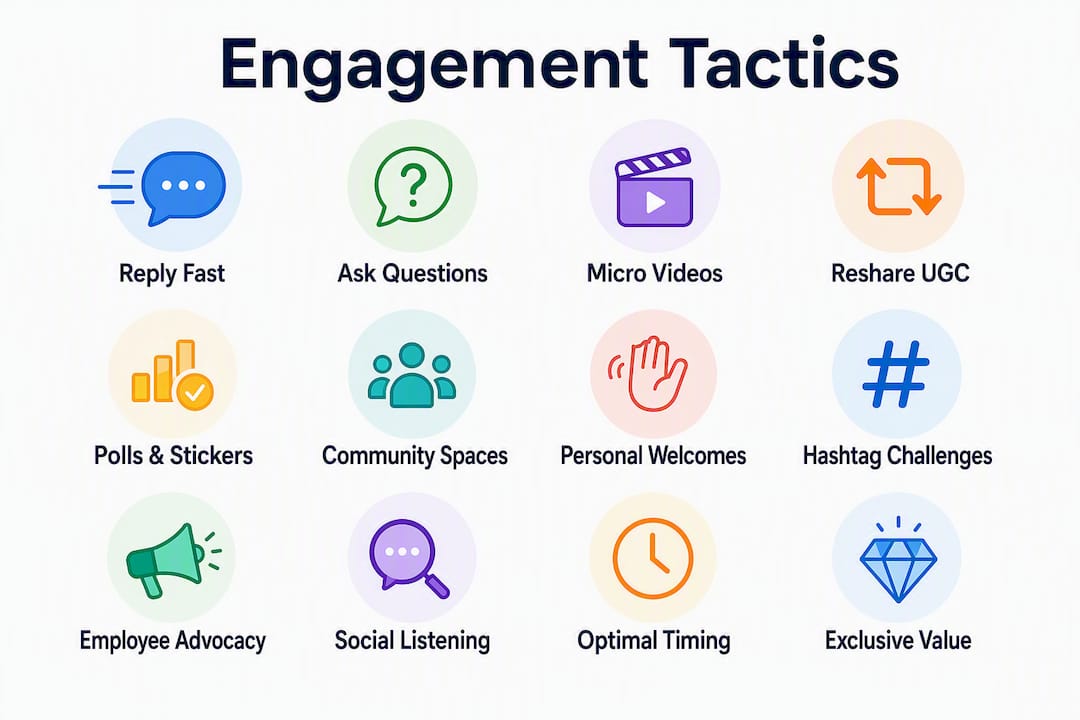
How to increase community engagement on social media: 12 tactics that actually work
These are ordered by expected lift versus effort. Start at the top.

1. Reply to comments within the first hour
Block 15–30 minutes immediately after publishing. Respond to every comment, even with a question back. Sprinklr reports engagement on Threads can increase by up to 42% when accounts reply promptly after posting, while LinkedIn shows engagement can rise by up to 30% with early replies.
KPI: Engagement rate on that post. Time: 15–30 minutes per post.
2. Ask one low-friction question per post

End every caption with a question that takes under 10 seconds to answer. “Morning coffee or afternoon espresso?” beats “What are your thoughts on productivity?” every time. Binary and single-word answers outperform open-ended asks for comment volume.
KPI: Comment count. Time: 2 minutes to add to any caption.
3. Use short-form micro-edutainment video
Under-60-second videos with a hook in the first three seconds and a clear payoff outperform longer clips for both reach and engagement. Sprinklr and Postory both confirm that format-to-platform fit matters: short native video wins on Threads and TikTok; carousels win on LinkedIn.
KPI: Watch-through rate, saves. Time: 60–180 minutes to produce.
Pro Tip: On TikTok, reply to a comment with a video instead of text. The reply video gets its own distribution and pulls the original commenter back into the thread.
4. Reshare user-generated content with a genuine response
Tag the creator, add your perspective in one sentence, and ask a follow-up question. Hootsuite’s UGC guidelines note that brands resharing UGC consistently see higher trust signals and repeat participation from the original creators. For a deeper look at running a full UGC program, Take-action’s UGC campaign ideas guide covers briefs and permission workflows.
KPI: Saves, shares, repeat commenter count. Time: 10 minutes per reshare.
5. Run weekly polls and story stickers
Buffer and Hootsuite both flag platform-native interactive tools (Instagram Story polls, LinkedIn polls, Threads question stickers) as high-conversion mechanics because they lower participation friction to a single tap.
KPI: Poll response rate. Time: 5 minutes to set up.
6. Dedicate a community space (group or channel)
A Facebook Group, LinkedIn Newsletter, or Discord server gives your most engaged followers a place to talk to each other, not just to you. That peer-to-peer dynamic is what separates a following from a community. For e-commerce brands, Take-action’s community building guide covers onboarding flows for new members.
KPI: Member post rate, weekly active members. Time: 2–4 hours to set up; 30 minutes/week to moderate.
7. Welcome new followers and members personally
A short, specific welcome message (not a generic “Thanks for following!”) converts passive followers into active participants. Template: “Hey [name], glad you’re here. Quick question: what brought you to [topic]? We talk about it a lot.”
KPI: Reply rate on welcome messages. Time: 1–2 minutes per new member.
8. Run a branded challenge or hashtag campaign
Give your audience a specific, low-stakes action to complete and share. The best challenges are visual, repeatable, and tied to something your community already cares about. A giveaway rules template: state the action, the prize, the deadline, and the winner-selection method in the caption.
KPI: Hashtag use volume, UGC submissions. Time: 2–3 hours to plan; ongoing monitoring.
9. Use employee advocacy posts
Employees posting authentic behind-the-scenes content from their own accounts consistently outperform brand-account posts on LinkedIn. Reach is wider, trust is higher, and the comments tend to be more substantive.
KPI: Reach per post, comment quality. Time: 30 minutes to brief employees weekly.
10. Jump into untagged conversations through social listening
Set keyword alerts for your brand name, product category, and competitors’ pain points. When someone asks “Does anyone know a good [your category]?” without tagging you, that is a warm lead for a genuine, helpful reply.
KPI: Conversations joined per week. Time: 15 minutes/day with a listening tool.
11. Post at peak activity windows for your specific audience
Generic “best times to post” advice is noise. Pull your own analytics and find the 2–3 windows when your audience is most active. Schedule posts to drop 15 minutes before those windows so the first wave of comments arrives during peak hours.
KPI: Impressions-to-engagement ratio. Time: 30 minutes to audit once per quarter.
12. Offer exclusive value to active community members
Early access, private Q&As, or a members-only newsletter for your top commenters creates a loyalty loop. People who feel recognized participate more, and their activity signals to others that the community is worth joining.
KPI: Repeat commenter count (weekly). Time: 1–2 hours/month to organize.
What content formats and prompts reliably spark replies?
The formula is simple: hook, payoff, one-question CTA. The question has to be answerable in under 10 seconds, or most people will scroll past.
Copyable prompts by platform
Instagram Stories (polls and sliders):
- "Rate this: or "
- “Would you rather: [Option A] or [Option B]?”
- “Hot take: [your opinion]. Agree or disagree?”
- “What’s your go-to for [topic]? A / B / C / D”
LinkedIn (carousels and text posts):
- “Unpopular opinion: [your take]. Here’s why I think so. What’s your experience?”
- “I made this mistake so you don’t have to. [3-slide carousel]. Which of these have you done?”
- “The advice I wish I’d gotten in year one: [insight]. What would you add?”
Threads and TikTok (short video and text):
- “Tell me you work in [industry] without telling me you work in [industry].”
- “The thing nobody talks about in [topic]: [your take].”
- “Reply with your answer: [binary question].”
AMAs (any platform):
- “I’ve spent [X] years doing [thing]. Ask me anything about [specific topic] in the comments.”
- “Drop your biggest [topic] question below. I’ll answer the top 5 this week.”
Why low-friction design works
Buffer’s interactive-format research shows that Story polls and stickers generate responses from followers who would never type a comment. The participation barrier is a single tap. Open-ended questions require cognitive effort; binary questions require a preference. Most people have preferences.
Heropost’s 2026 analysis adds that opinionated, edutainment-style content provokes more substantive comments than neutral summaries. Taking a clear stance gives people something to agree or disagree with, which is the engine of comment threads.
Three platform notes:
- LinkedIn carousels: each slide is a micro-commitment; readers who swipe to slide 3 are primed to comment. End the last slide with a direct question.
- Threads/short video: Postory’s format analysis confirms native video outperforms linked content; keep it under 60 seconds with the payoff before the 30-second mark.
- Instagram Stories: polls beat open text boxes by a wide margin for response rate. Use the slider for sentiment, the poll for binary choices, and the question sticker only when you can respond to every answer personally.
How do you moderate and onboard community members well?
Good moderation is invisible when it works. Members feel safe, conversations stay on-topic, and the manager is not spending four hours a day putting out fires.
A moderation workflow for small teams
Triage rules: Sort incoming comments and DMs into three buckets: (1) genuine questions or conversation, (2) complaints or sensitive issues, (3) spam or policy violations. Handle bucket 1 within 2 hours during business hours, bucket 2 within 30 minutes, and bucket 3 immediately with a hide or delete.
Response SLAs: Set a public expectation (“We reply within 24 hours on weekdays”) and beat it. Consistency matters more than speed for community trust.
Escalation threshold: Any comment involving a legal claim, a safety issue, or a media-worthy complaint goes directly to a senior team member or legal, not to a community manager working from a template.
Role definitions for a team of two: One person owns proactive engagement (posting, replying, running polls). The other owns reactive moderation (DMs, complaints, escalations). Overlap on UGC and listening.
Welcome message template
Keep it under 50 words. The question at the end converts a welcome into a two-way conversation immediately.
Three conflict-resolution steps
- Acknowledge privately first. Move heated exchanges to DMs before they escalate publicly. “I’d love to understand your experience better. Can I DM you?”
- Separate the person from the complaint. Respond to the issue, not the tone. “That sounds frustrating. Here’s what we can do.”
- Close the loop publicly. After resolving in DMs, post a brief public note: “We connected with [name] and sorted this out. Thanks for flagging it.”
Tone guidance: Use pre-approved templates for routine replies (FAQs, shipping questions, event details). Write bespoke replies for anything emotional, nuanced, or public-facing. A template used in the wrong moment is worse than no reply at all.
Staffing reality: A community of under 5,000 active members typically needs 1–2 hours per day of dedicated moderation. Above 20,000 active members, a part-time or full-time community manager is usually necessary. Outsourcing moderation to an agency works for routine triage but always keep escalation decisions in-house.
How do you measure social media engagement accurately?
Follower count tells you almost nothing about community health. These are the metrics that actually matter.
Primary KPIs and when to use them
| Metric | Formula | Best for |
|---|---|---|
| Engagement rate (impressions) | (Likes + Comments + Shares + Saves) ÷ Impressions × 100 | Awareness campaigns |
| Engagement rate (reach) | (Likes + Comments + Shares + Saves) ÷ Reach × 100 | Content quality benchmarking |
| Comment rate | Comments ÷ Impressions × 100 | Community health |
| Repeat commenter count | # of users who commented 2+ times in 30 days | Long-term retention |
| DM response time | Average minutes from receipt to first reply | Customer experience |
| Share rate | Shares ÷ Reach × 100 | Virality and advocacy |
Sample calculation
Say a post gets 12,000 impressions, 340 likes, 87 comments, 52 shares, and 29 saves.
Total interactions: 340 + 87 + 52 + 29 = 508 Engagement rate (impressions): 508 ÷ 12,000 × 100 = 4.23%
For context, Socialk.it’s research identifies repeat commenters as the single best predictor of community health. Track how many of those 87 commenters show up again next week.
Benchmarks and measurement cadence
Average engagement rates vary significantly by platform and audience size, but a comment rate above 0.5% on a non-promoted post is a strong signal of genuine community activity. Saves and shares carry more weight than likes because they require deliberate intent.
Measurement cadence:
- Weekly velocity check: compare this week’s comment rate and repeat commenter count to last week’s.
- 30-day campaign window: run a tactic for a full month before drawing conclusions. One week is too short to separate signal from noise.
- Quarterly audit: pull your top 10 posts by comment rate and identify the format, topic, and question type they share.
Simple A/B test idea: Post the same core content two weeks in a row, changing only the closing question. Week 1: open-ended. Week 2: binary. Compare comment counts. That single variable tells you more than any benchmark.
Which tools help you scale engagement without losing authenticity?
The right stack handles the mechanical work (scheduling, routing, tagging) so your team can focus on the conversations that actually require a human.
Tool categories and use cases:
- Scheduling and analytics: — Buffer or Later for scheduling posts at optimal windows and pulling per-post engagement data without platform-hopping.
- UGC collection: A dedicated hashtag plus a tool like TINT or Bazaarvoice to collect, rights-manage, and repurpose user content. Take-action’s UGC agency guide covers the permission checklist in detail.
For a broader comparison of social tools by use case, the best social media tools guide from Visual Identity Studio covers scheduling, listening, and analytics options across budget tiers.
Three templates to use immediately
UGC submission brief (caption or DM): DM auto-reply to capture emails: Moderation hand-off checklist:
- [ ] All comments from the last 24 hours triaged
- [ ] Escalations flagged and assigned
- [ ] UGC tagged for resharing queue
- [ ] Listening alerts reviewed
- [ ] Repeat commenters noted for personal follow-up
When to automate vs. stay manual: Automate keyword tagging, DM routing, and post scheduling. Never automate responses to complaints, sensitive questions, or anything that requires judgment. A bot reply to a frustrated customer is worse than a delayed human one.
Does replying fast and listening actually move the numbers?
Yes, and the evidence is specific enough to build an experiment around.
Buffer’s reply-first research recommends blocking 15–30 minutes after each post for replies, tying that practice to measurable distribution boosts through algorithmic amplification. Sprinklr’s analysis puts the Threads lift at up to 42% when accounts reply promptly. LinkedIn shows an increase of up to 30% with fast replies.
“Treat social as conversation, not broadcast: allocate 15–30 minutes after posting to reply and prioritize repeat commenters to grow community health over vanity metrics.” — Buffer
Hootsuite’s social listening guidance frames untagged mentions as a high-leverage, underused entry point. Most brands only respond when tagged. The brands that monitor topic conversations and join them unprompted show up as relevant and timely in ways that scheduled content alone cannot replicate.
30-day experiment template
Baseline (Week 1): Pull your average comment rate, repeat commenter count, and engagement rate for the previous 30 days. Do not change anything yet.
Intervention (Weeks 2–4): Make two changes only: (1) block a 20-minute reply window after every post, and (2) spend 15 minutes per day in your listening tool joining two untagged conversations. Change nothing else about your content.
Weekly check: Every Monday, compare comment rate and repeat commenter count to baseline. Note any posts that generated unusually high activity and identify what they had in common.
Expected outcomes: Based on Buffer and Sprinklr findings, a consistent reply-first practice tends to produce double-digit lifts in comment rate within 30 days. Repeat commenter counts typically grow more slowly, but a 20–30% increase over a month is a realistic target for accounts starting from a low base.
Pro Tip: Run this experiment on one platform only. Adding a second platform mid-experiment makes it impossible to isolate what caused the lift.
Why does community engagement matter for your brand?
The difference between a large following and a real community is participation. Followers consume; community members contribute, return, and advocate.
Engaged communities generate organic reach that paid media cannot replicate. When members share your content, reply to each other, and tag friends, the algorithm reads that as high-value content and distributes it further. That flywheel compounds over time in a way that buying impressions does not.
There is also a trust dimension. Sprout Social’s community management framework defines social community management as the process of building authentic connections that increase brand loyalty. Loyalty built through genuine conversation is more durable than loyalty built through discounts. A customer who has had a real exchange with your brand is harder to poach with a competitor’s coupon.
Finally, engaged communities are research assets. The comments, DMs, and poll responses your community generates are unfiltered market research. The language your members use to describe their problems is the language your ads and emails should use.
How do you keep community members coming back long-term?
Short-term engagement tactics get people to comment once. Retention rituals get them to come back every week.
The most durable loyalty loops share three traits: they recognize individual members, they deliver exclusive value, and they create a sense of progression or belonging that grows over time.
Recognition: Call out your most active commenters by name in a weekly post. “This week’s best comment came from [name]” costs nothing and creates a powerful incentive to participate. People want to be seen.
Exclusive access: Give your top 10% of commenters something the rest of the audience does not get: early product access, a private Q&A, a members-only newsletter. The exclusivity itself is the value. Socialk.it’s research identifies nurturing rituals for repeat commenters as the most predictive lever for long-term community health.
Progression and identity: Communities with a clear identity (“we are the people who believe X”) retain members better than communities built around a brand alone. Give your community a name, a shared vocabulary, and a reason to identify as members, not just followers.
Consistent cadence: Post at the same times each week. Members who know when to expect new content build a habit around it. Irregular posting breaks the habit loop and accelerates churn.
Re-engagement sequences: When a previously active member goes quiet for 30 days, send a personal DM: “Hey [name], haven’t seen you around lately. We just posted [relevant thing] and thought of you.” That personal touch converts dormant members back into active ones at a much higher rate than a broadcast post.
How do influencer and partner collaborations increase engagement?
The fastest way to reach a new, warm audience is to borrow trust from someone they already follow. That is the core logic of influencer and partner collaboration.
Micro-influencers over mega-influencers for engagement. An influencer with 15,000 highly engaged followers in your niche will typically generate more comments, shares, and community crossover than a celebrity with 2 million passive ones. The audience is smaller but the trust is deeper, and the comments tend to be substantive rather than emoji reactions.
Co-created content outperforms sponsored posts. When a partner or influencer creates content with you rather than for you, the result feels authentic to both audiences. A joint Instagram Live, a collaborative carousel, or a co-hosted AMA generates engagement from two communities simultaneously and gives both sides a reason to promote it.
Activation structure matters. Give collaborators a specific prompt or challenge to respond to rather than a brief that says “post about us.” “Show your audience how you use [product/service] in your [morning routine/workflow/creative process]” generates more varied, authentic content than “here are the talking points.”
Track the right metrics for collaborations. Follower growth is a vanity metric for partnerships. Track comment quality (are new commenters asking real questions?), repeat visit rate from the partner’s audience, and UGC submissions that come in during or after the collaboration window.
Partner with complementary brands, not just influencers. A brand whose audience overlaps with yours but does not compete directly is a natural co-promotion partner. Joint giveaways, shared content series, and cross-platform challenges give both brands access to each other’s most engaged members.
Key Takeaways
The single highest-leverage move to increase community engagement on social media is blocking a dedicated reply window after every post, because early replies compound algorithmically and build the repeat-commenter base that predicts long-term community health.
| Point | Details |
|---|---|
| Reply first, always | Block 15–30 minutes after each post to reply; Buffer links this window to measurable distribution boosts. |
| Low-friction questions drive comments | Binary or single-word questions outperform open-ended asks for comment volume on every platform. |
| Track repeat commenters weekly | Repeat commenter count is the single best predictor of community health, ahead of follower count or total likes. |
| Social listening finds warm conversations | Monitor untagged mentions daily; joining those conversations increases relevance without additional content spend. |
| Take-action extends community into email | Move top commenters into a retention email flow to keep them active between posts and reduce churn. |
The case for listening over posting
Most social media advice is about what to publish. The brands with the most engaged communities are obsessed with what they hear.
Reply-first behavior and social listening are prioritized here not because they are trendy but because they are the tactics with the clearest causal link to the metrics that actually matter: comment rate, repeat commenter count, and community retention. Follower count is a lagging indicator of past decisions. Repeat commenters are a leading indicator of future revenue.
The practical implication is uncomfortable for content-heavy teams: you can post less and engage more and see better results. A team that publishes five times a week and replies to nothing will consistently underperform a team that publishes three times a week and replies to everything within an hour.
Before committing to a full 12-tactic program, test just two things for 30 days: the reply window and one weekly poll. If those two moves do not move your comment rate and repeat commenter count, nothing else in this guide will either. Start there, measure it honestly, and build from what you learn.
Email keeps your community active between posts
Social engagement spikes around posts and then fades. Email is what keeps your most active community members connected to your brand in the days and weeks between those spikes.
The practical move: when a follower comments consistently, DMs you, or submits UGC, invite them into a dedicated email list. A short welcome flow that delivers exclusive content, early access, or a behind-the-scenes look at your brand turns a social interaction into a durable retention channel. That list becomes your most responsive segment for product launches, campaigns, and re-engagement.
Take-action specializes in building exactly that kind of email infrastructure: welcome flows, segmentation by engagement behavior, and campaign strategy that aligns with your social content calendar. If you are ready to turn your most active community members into a high-retention email audience, see how Take-action works and get in touch for a strategy conversation.
Useful sources and further reading
- Buffer: Social Media Engagement Guide — Benchmarks, reply-first tactics, and interactive format recommendations backed by platform data.
- Hootsuite: How to Measure and Increase Social Media Engagement — Social listening workflows, UGC guidelines, and engagement measurement frameworks.