

SEO for Ecommerce Websites: A Practical 2026 Playbook
Prioritize your technical foundation first. Fix missing product schema, resolve mobile Core Web Vitals failures, and clean up crawl/index hygiene before touching anything else. Those three levers explain more ranking variance for ecommerce pages than any other factors in Visionary Marketing’s 2026 ecommerce ranking factor study, which analyzed 100,000 pages and found schema completeness alone correlates at 0.78 with product-page rankings.
Here are the immediate wins you can run in a day or a week:
- Fix missing or incomplete product schema — open Google Search Console’s Rich Results report and resolve every Product schema error before anything else.
- Audit your top 20 product pages in PageSpeed Insights — identify LCP bottlenecks (usually unoptimized hero images or render-blocking scripts) and fix the worst offenders first.
- Canonicalize filtered URLs — add
rel=canonicalpointing to the clean category URL on every faceted navigation page that doesn’t deserve its own index entry. - Add a significant amount of buyer-focused copy to your top category pages — most stores have bare category pages that rank for nothing because they give Google nothing to work with.
- Enable Review and Offer schema — AggregateRating and Offer fields in your Product schema directly improve click-through rate and Shopping eligibility.
Start with Google Search Console, PageSpeed Insights, and a crawler like Screaming Frog.
Key Takeaways
Ecommerce SEO requires a technical foundation, content depth, programmatic scale, and consistent measurement working together — no single lever moves rankings in isolation.
| Point | Details |
|---|---|
| Schema completeness is the top ranking factor | Product schema with complete Offer and AggregateRating fields correlates at 0.78 with product-page rankings per the 2026 ranking factor study. |
| Fix technical blockers before content | Faceted navigation index bloat, LCP failures, and poor canonicalization filter stores out of rankings regardless of content quality. |
| Category pages need real copy | Add a sufficient amount of buyer-focused introductory text to category pages; bare product grids rank for almost nothing in competitive niches. |
| Programmatic templates scale SEO | Use tokenized metadata templates and server-side schema injection for large catalogs; reserve hand-written descriptions for your top revenue-driving SKUs. |
| Take-action connects SEO to retention | Take-action’s Klaviyo-powered email flows convert and re-engage organic visitors, shortening the payback window on SEO investment. |
Table of Contents
- How does keyword research work for ecommerce SEO?
- How should you structure an ecommerce site for SEO?
- What makes a product page rank and convert?
- What technical SEO issues hurt ecommerce rankings most?
- Which schema types matter most for ecommerce?
- How do you build a content strategy beyond product pages?
- What link-building tactics actually work for ecommerce?
- How do you measure ecommerce SEO and run audits?
- How do you scale SEO across thousands of SKUs?
- What are the most common ecommerce SEO mistakes?
- SEO compounds when you connect it to the rest of your growth stack
- How email retention turns your SEO traffic into lasting revenue
- Sources
How does keyword research work for ecommerce SEO?
Keyword research for ecommerce isn’t one exercise — it’s three, mapped to three different page types. Get the mapping wrong and you’ll optimize product pages for informational queries that never convert, or category pages for long-tail terms that belong on a blog post.
Segment by intent first
Every keyword your store could rank for falls into one of three buckets:
- Transactional (“buy running shoes size 10,” “Nike Air Max 270 free shipping”) — these belong on product pages.
- Commercial investigation (“best running shoes for flat feet,” “Nike vs Adidas trail shoes”) — these belong on category pages or buying guides.
- Informational (“how to break in new running shoes,” “what’s the difference between stability and neutral shoes”) — these belong on blog posts or editorial content.
Mapping the wrong intent to the wrong page type is one of the most common SEO mistakes in ecommerce. A product page optimized for “how to choose running shoes” will rarely rank well because Google knows the searcher isn’t ready to buy yet.
A practical keyword discovery workflow
Start with your top-selling product categories as seed terms. Feed them into Ahrefs or SEMrush and filter for commercial and transactional intent. Pull the “also rank for” and “questions” reports to find long-tail variants. Then go back to Google Search Console and pull your existing queries — sort by impressions with low clicks. Those are your missed-opportunity keywords: pages Google is already showing for queries where you’re not compelling enough to earn the click.
For SMBs without a full Ahrefs or SEMrush subscription, Google’s own tools get you surprisingly far. Search Console’s Performance report, combined with Google Keyword Planner and autocomplete, can surface enough data to prioritize your first 30–50 target keywords without spending a dollar.
Pro Tip: Use Search Console’s “Queries” filter on a specific product or category URL to see exactly which search terms are already driving impressions to that page. You’ll often find a keyword you’re ranking 8th or 9th for that, with a title tag tweak, could jump to page one.
For keyword research at scale, build a mapping spreadsheet with these fields:
| Field | Purpose |
|---|---|
| Keyword | The exact search term |
| Intent | Transactional / Commercial / Informational |
| Target URL | The page that should rank for this term |
| Monthly Search Volume | Demand signal |
| Keyword Difficulty | Prioritization filter |
| Current Ranking Position | Baseline from Search Console |
| Priority | High / Medium / Low based on impact vs. effort |
Brand vs. non-brand and seasonal keywords
Brand queries (your store name, branded product lines) should be tracked separately from non-brand queries. Non-brand organic traffic is the real growth lever — it’s where new customers find you. For seasonal keywords (“Christmas gift sets,” “back-to-school backpacks”), build your content and category pages at least 60–90 days before the season peaks. Google needs time to crawl, index, and rank new or updated pages.
How should you structure an ecommerce site for SEO?
Site architecture is the skeleton of your SEO. Get it wrong and you’ll spend years fighting crawl inefficiency, authority dilution, and products buried so deep that Google rarely visits them.
Keep the hierarchy flat and logical
The ideal ecommerce hierarchy looks like this: Homepage → Category → Subcategory → Product. Four levels maximum for most stores. Every product should be reachable within three clicks from the homepage. When products are buried six or seven levels deep, crawl budget gets wasted on pages that matter least, and link equity from your homepage barely reaches your SKUs.
For large catalogs, resist the urge to create dozens of narrow subcategories. Instead, use topic hubs: a single well-linked category page that covers a broad topic and links to tightly related subcategories and products. This concentrates authority and gives Google a clear signal about what each section of your site covers.
URL conventions that help rankings and analytics
Clean, human-readable URLs outperform parameter-heavy ones in both rankings and click-through rate. Compare:
yourstore.com/running-shoes/mens-trail-running(good)yourstore.com/category.php?id=482&filter=mens&type=trail(bad)
Keep URLs lowercase, use hyphens as word separators, and include the primary keyword for that page. Avoid repeating parent categories in every URL segment — it creates unnecessary length without SEO benefit.
Internal linking rules that actually move rankings
Your main navigation handles the top-level authority distribution, but contextual internal links from content pages are where most stores leave value on the table. Three practical rules:
- Every blog post or buying guide should link to at least three relevant product or category pages.
- Product pages should link to related products and to the parent category.
- Category pages should link to subcategories and to the most popular products within them.
Breadcrumbs serve double duty: they help users navigate and they create a secondary internal linking structure that reinforces your hierarchy for crawlers. Implement BreadcrumbList schema alongside them (covered in the structured data section below).
Pro Tip: Run a crawl in Screaming Frog and sort pages by inlinks. Any product or category page with very few internal links may be effectively invisible to Google’s link equity flow. Fix those first before building any external links.
What makes a product page rank and convert?
Product pages and category pages need different optimization templates. Treating them the same is why most stores plateau.
Product page template
A well-optimized product page covers these elements:
- Title tag: Primary keyword + product name + brand, under 60 characters. Example: “Men’s Trail Running Shoes — Brooks Ghost 15.”
- Meta description: 150–160 characters, include the keyword, a benefit, and a soft call to action.
- H1: Match the product name closely; include the primary keyword variant naturally.
- Product description: Write 300–600 words minimum. Cover who the product is for, key benefits, technical specs, use cases, and care instructions. Thin descriptions are one of the fastest ways to get filtered out of competitive SERPs.
- Images: Use WebP or AVIF format, include descriptive filenames (
brooks-ghost-15-mens-trail-shoe-blue.webp), and write alt text that describes the image accurately. Lazy-load below-the-fold images. - Reviews: Display them prominently. Reviews add unique, keyword-rich content to your page and signal trust to both users and Google.
- Price and availability: Always visible above the fold. This matters for both conversion and schema eligibility.
Category page template
Category pages often rank for the highest-volume commercial queries in your niche. They deserve real investment. Per the 2026 ecommerce SEO guide from Nevuto, a 200–400 word intro section of buyer-focused copy is the baseline. Add secondary content — a short buying guide, an FAQ block, or a comparison table — and you have a page that can rank for dozens of related queries simultaneously.
Pagination handling matters here too. Use rel=next and rel=prev for paginated category pages, or implement infinite scroll with proper URL management so Google can crawl all products in the category.
Schema fields every product page needs
According to BigCommerce’s ecommerce SEO guide, pages with complete Product, Offer, and AggregateRating schema see measurable lifts in organic click-through rate and Shopping eligibility. The minimum viable schema for a product page includes:
| Schema Field | Why It Matters |
|---|---|
name |
Product name in search results |
sku |
Merchant Center matching |
brand |
Brand filter eligibility |
offers.price |
Price display in rich results |
offers.priceCurrency |
Required for Shopping |
offers.availability |
In-stock signal for Shopping |
aggregateRating.ratingValue |
Star ratings in SERPs |
aggregateRating.reviewCount |
Social proof signal |
For a practical example of how product schema maps to real catalog pages, see how vinyl collectibles product collections structure their product data — each item carries consistent name, SKU, and offer fields that feed directly into schema markup.
Image optimization specifics
Serve images in WebP or AVIF. Both formats deliver significantly smaller file sizes than JPEG at comparable quality. Use srcset to serve appropriately sized images to different screen widths. Lazy-load everything below the fold. For hero product images, preload them in the <head> — this is one of the fastest LCP wins available.
Handling reviews and UGC
User-generated content on product pages is an SEO asset when managed well. Moderate reviews to remove spam and policy violations, but don’t delete negative reviews — a mix of ratings looks more authentic and converts better than a suspiciously perfect 5.0. Implement AggregateRating schema to pull star ratings into search results. For Q&A sections, consider adding FAQ schema to the most common questions.
What technical SEO issues hurt ecommerce rankings most?
Technical SEO is the foundation. Content and links matter, but failing Core Web Vitals or broken crawl architecture will systematically filter a store out of top rankings regardless of how good the content is. Practical ecommerce audits consistently show that mobile LCP and image/JS optimization are the most frequent technical blockers.
Core Web Vitals for ecommerce
LCP (Largest Contentful Paint) is the metric that hurts ecommerce stores most. The culprit is almost always the hero product image: too large, not preloaded, served in the wrong format. Target a low Largest Contentful Paint (LCP) time on mobile for optimal performance. CLS (Cumulative Layout Shift) is the second most common failure — caused by images without explicit dimensions, late-loading ads, or fonts that swap after render. INP (Interaction to Next Paint) replaced FID in 2024 and measures responsiveness; heavy JavaScript on product pages is the usual offender.
Crawl budget and index management
For stores with thousands of SKUs, crawl budget is a real constraint. Wasted crawl budget on low-value pages means Google visits your most important product pages less frequently. Practical controls:
- Block crawlers from internal search results, account pages, and checkout flows via
robots.txt. - Use
noindexon thin or duplicate pages that shouldn’t rank but shouldn’t be blocked from crawling (like paginated pages beyond page 2 in some cases). - Submit segmented XML sitemaps: one for products, one for categories, one for blog content. This lets you monitor indexation health by page type in Search Console.
Faceted navigation: the biggest crawl trap in ecommerce
Faceted navigation — the filter panels that let shoppers sort by color, size, price, and brand — generates thousands of URL combinations that are nearly identical in content. According to Search Engine Journal’s technical SEO guidance, these duplicate parameter URLs cause index bloat and crawl budget waste that are among the most critical technical problems for ecommerce stores.
The fix depends on the filter type:
- Filters that create genuinely useful, rankable pages (e.g., “red running shoes size 10”) — allow indexation with a canonical pointing to the filtered URL.
- Filters that create near-duplicate pages with no unique search demand — add
rel=canonicalpointing to the parent category URL, or usenoindex. - Use Google Search Console’s URL Parameters tool (or configure via
robots.txtdisallow) to prevent crawling of high-volume, low-value filter combinations.
Performance targets and tooling
| Metric | Target | Primary Tool |
|---|---|---|
| LCP (mobile) | Low Largest Contentful Paint (LCP) time | PageSpeed Insights / Lighthouse |
| CLS | Low Cumulative Layout Shift (CLS) value | PageSpeed Insights / Chrome UX Report |
| INP | Under 200ms | Chrome UX Report / Search Console |
| Crawl errors | 0 critical | Screaming Frog / Search Console |
| Index coverage | No unexpected exclusions | Google Search Console |
| Sitemap freshness | Updated promptly after changes | Search Console Sitemaps report |
Which schema types matter most for ecommerce?
Schema markup is no longer optional for competitive ecommerce. Visionary Marketing’s 2026 ranking factor study found product schema completeness has the highest Spearman correlation (0.78) with product-page rankings across their 100,000-page analysis. Schema, review aggregation, and mobile performance together explain a large share of ranking variance for ecommerce pages.
Schema types by page type
- Product pages:
Product,Offer,AggregateRating,Review,BreadcrumbList - Category pages:
CollectionPage,ItemList,BreadcrumbList - Blog/buying guides:
Article,FAQPage,BreadcrumbList - Homepage:
Organization,WebSite,SiteLinksSearchBox
A minimal JSON-LD example for a product page
{
  "@context": "https://schema.org/",
  "@type": "Product",
  "name": "Brooks Ghost 15 Men's Trail Running Shoe",
  "sku": "BG15-M-BLU-10",
  "brand": {
    "@type": "Brand",
    "name": "Brooks"
  },
  "offers": {
    "@type": "Offer",
    "url": "https://yourstore.com/running-shoes/brooks-ghost-15-mens",
    "priceCurrency": "USD",
    "price": "139.95",
    "availability": "https://schema.org/InStock"
  },
  "aggregateRating": {
    "@type": "AggregateRating",
    "ratingValue": "4.7",
    "reviewCount": "312"
  }
}
Programmatic schema injection
For stores with hundreds or thousands of SKUs, hand-coding schema is not realistic. Inject JSON-LD programmatically from your product feed data. On Shopify, this means editing your product.liquid template to output schema fields from product metafields. On custom platforms, generate JSON-LD server-side from your product database. Google Tag Manager can inject schema for smaller catalogs, but server-side generation is more reliable and harder to break.
After deploying schema, test every page type in Google’s Rich Results Test and monitor the Search Console Enhancements reports for errors. A single missing required field (like priceCurrency) can disqualify an entire product type from rich result eligibility.
Google’s AI Overviews increasingly pull from structured, schema-rich content. Explicit schema signals help your products appear in generative SERP features — not just traditional blue links.
How do you build a content strategy beyond product pages?
Product and category pages capture buyers. Content captures everyone earlier in the funnel — and then funnels them toward a purchase. The stores that dominate organic search in competitive niches almost always have a content layer that product-only stores lack.
When to write long-form buying guides
Write a buying guide when the purchase decision is complex enough that a buyer needs help. “Best trail running shoes for flat feet” is a buying guide topic. “Buy Brooks Ghost 15” is a product page topic. The distinction matters because buying guides rank for commercial investigation queries that have high volume and high purchase intent — but they convert over days or weeks, not in a single session.
Length depends on the complexity of the purchase. A guide for a $30 accessory might need 800 words. A guide for a $2,000 piece of fitness equipment might need 2,500 words with comparison tables, use-case breakdowns, and expert input. Match depth to decision complexity, not to a word count target.
Topical clusters and internal linking
A topical cluster pairs one pillar page (a broad, authoritative guide on a topic) with several supporting articles that cover subtopics in depth. The pillar links to every supporting article; each supporting article links back to the pillar and to relevant product or category pages. This structure signals topical authority to Google and concentrates link equity on your commercial pages.
For a running shoe store, the cluster might look like:
- Pillar: “The Complete Guide to Choosing Running Shoes”
- Supporting: “Best Running Shoes for Flat Feet,” “How to Measure Your Running Gait,” “Trail vs Road Running Shoes: What’s the Difference”
- Each supporting article links to: the pillar + 2–3 product or category pages
For a deeper look at how to build this out, the 2026 content strategy guide for ecommerce covers cluster architecture and editorial calendar planning in detail.
AI-assisted content: where it helps and where it hurts
AI tools can accelerate first drafts, generate product description variations at scale, and help with meta description templates. Where they consistently fail is in producing genuinely useful, experience-backed content that earns links and ranks for competitive queries. Google’s helpful content guidance targets thin, generic AI output specifically. Use AI to handle the mechanical work (metadata, structured outlines, FAQ drafts) and reserve human writing for buying guides, category intros, and any content you want to earn links.
Editorial calendar for seasonal and evergreen content
Plan seasonal content 60–90 days ahead of peak. Map evergreen topics to your highest-volume commercial queries and update them annually. A simple calendar structure:
- Q1: Post-holiday clearance guides, Valentine’s Day gift content
- Q2: Spring/summer product launches, Mother’s Day
- Q3: Back-to-school, early holiday planning
- Q4: Black Friday/Cyber Monday, holiday gift guides
What link-building tactics actually work for ecommerce?
Link building for ecommerce is slower and harder than for SaaS or media sites. Most product pages will never earn a link organically. That’s why your content layer exists — it’s the link magnet that passes authority down to your commercial pages.
Tactics worth your time
Product review seeding: Send products to niche bloggers, YouTubers, and independent reviewers in your category. A genuine product review on a relevant site passes more authority than ten generic directory links. Focus on sites with real traffic and editorial standards, not link farms dressed up as review blogs.
PR for product launches: A new product launch is a legitimate news hook. Pitch trade publications, niche media, and gift guides. “Best gifts for runners 2026” roundups in running publications are worth pursuing aggressively in Q3 each year.
Original data and research: Publish a study, a survey, or an original data analysis relevant to your niche. Data earns links because journalists and bloggers need sources. A running shoe store that surveys 1,000 runners about their injury patterns has a linkable asset. A store that just sells shoes does not.
Partnerships and co-marketing: Complementary brands (not competitors) will often link to each other in the context of a joint campaign, a co-authored guide, or a shared resource page.
Measuring link value for ecommerce
Not all links move rankings equally. Prioritize referring domains by:
- Topical relevance: A link from a running magazine beats a link from a general lifestyle blog.
- Organic traffic: Use Ahrefs or SEMrush to check whether the linking domain actually receives search traffic. A high-DA site with no organic traffic is often a link farm.
- Referral conversions: Track referral traffic from new links in GA4. Links that send converting visitors are worth far more than links that send no one.
How do you measure ecommerce SEO and run audits?
Measurement without a cadence is just data collection. Build a rhythm: weekly checks for critical issues, monthly health reviews, quarterly strategy audits.
Core KPIs to track
- Organic sessions (non-brand and brand, segmented)
- Organic revenue (GA4 ecommerce tracking, attributed to organic channel)
- Organic conversion rate (organic sessions to transactions)
- Impressions and CTR for commercial queries (Search Console Performance report)
- Indexed product count (Search Console Index Coverage report)
- Core Web Vitals trends (Search Console Core Web Vitals report + Chrome UX Report)
Using Search Console and GA4 together
Link your Google Search Console property to GA4 to get query-level data alongside on-site behavior. In GA4, create an organic traffic segment and apply it to your ecommerce reports to see which landing pages drive revenue, not just sessions.
For large catalogs, Search Console’s ecommerce-specific workflows — including linking to Google Merchant Center, monitoring the Shopping tab performance, and using the Index Coverage report segmented by sitemap — are the fastest way to catch indexation regressions before they become revenue problems.
Audit cadence
Weekly: Check Search Console for new crawl errors, manual actions, and CWV regressions. Review any pages that dropped significantly in rankings.
Monthly: Full index coverage review, sitemap health check, structured data error report, orphan page audit (pages with no internal links), and content performance review (which pages gained or lost organic traffic).
Quarterly: Full crawl with Screaming Frog, backlink profile review in Ahrefs or SEMrush, competitive gap analysis, and a strategy review against your 90-day roadmap.
How do you scale SEO across thousands of SKUs?
Manual SEO work hits a ceiling fast. At 500 SKUs, you can still hand-write product descriptions. At 5,000, you need systems. Programmatic SEO frameworks determine the ceiling of organic performance for large catalogs.

Programmatic metadata templates
Build title tag and meta description templates using product feed tokens. A template for a clothing store might look like:
- Title:
{Color} {ProductName} {Gender} — {Brand} | {StoreName} - Meta:
Shop the {ProductName} in {Color} from {Brand}. Free shipping on orders over $50.
Define fallback rules for missing data. If Color is null, fall back to {Material}. If Material is null, fall back to the product type. Never let a missing field produce a broken or empty title tag.
Schema injection at scale
Generate JSON-LD from your product feed server-side. Map feed fields to schema properties: product.title → name, product.price → offers.price, product.inventory → offers.availability. Run a nightly job that regenerates schema for any product whose price, availability, or rating has changed. Stale schema (showing a product as in-stock when it’s not) can trigger Merchant Center disapprovals and hurt Shopping performance.
For a practical example of how a well-structured product catalog maps to schema fields, the 12x12vinyl demonstrate consistent product data structure that translates cleanly into Product schema markup.
Automated monitoring
Set up Search Console alerts for index coverage drops. Run weekly crawls on a sample of your catalog (Screaming Frog can be scheduled) to catch broken links, missing titles, and redirect chains. Use a bulk CWV checker to monitor performance across your top product and category pages — a single template change can degrade LCP across thousands of pages simultaneously.
Pro Tip: Reserve hand-written, long-form product descriptions for your top 50–100 revenue-driving SKUs. For the rest, use programmatic templates. The 80/20 rule applies hard here: a small fraction of your catalog drives the majority of organic revenue, and those pages deserve human attention.
Governance for bulk changes
Before deploying any bulk metadata or schema change, test on a sample of 50–100 pages and monitor Search Console for 2–3 weeks. Define a rollback procedure: keep the previous template version in version control and document the deployment date so you can correlate any ranking changes to the change.
What are the most common ecommerce SEO mistakes?
Most stores make the same handful of mistakes. Fixing them is often faster than building new content or earning new links.
The most damaging mistakes
- Index bloat from faceted navigation — thousands of near-duplicate filter URLs consuming crawl budget and diluting authority. Fix with canonical tags and noindex rules.
- Missing or incomplete product schema — the single highest-correlation ranking factor in 2026, yet many stores either have no schema or have schema with missing required fields like
priceCurrencyoravailability. - Thin category pages — a category page with only a product grid and no copy gives Google nothing to rank. Add 200–400 words of buyer-focused intro text minimum.
- Unoptimized images — JPEG hero images over 500KB are still common on product pages. They tank LCP scores and mobile rankings simultaneously.
- Poor canonicalization — stores that don’t canonicalize paginated pages, sorted views, or product variants create duplicate content that splits ranking signals.
- Orphan pages — products added to the catalog but never linked from a category page or navigation. Google may never find them.
A 30/60/90-day roadmap
Days 1–30 (Technical Foundation — Engineering + SEO lead):
- Audit and fix all Product schema errors in Search Console.
- Canonicalize faceted navigation URLs.
- Fix LCP on top 20 product and category pages (image format, preload, CDN).
- Submit segmented XML sitemaps.
- Link Search Console to GA4 and Merchant Center.
Days 31–60 (Content Depth — Content team + SEO lead):
- Add a substantial amount of buyer-focused copy to top category pages.
- Write or rewrite product descriptions for top 50 revenue-driving SKUs.
- Publish two buying guides targeting commercial investigation queries.
- Implement BreadcrumbList schema site-wide.
- Audit internal linking and fix orphan pages.
Days 61–90 (Scale and Measurement — Full team):
- Deploy programmatic metadata templates across full catalog.
- Launch link-building outreach for product launch or original data asset.
- Set up monthly audit cadence in Search Console and Screaming Frog.
- Review GA4 organic revenue attribution and set KPI baselines.
- Run a competitive gap analysis in Ahrefs or SEMrush and identify top 10 keyword opportunities.
SEO compounds when you connect it to the rest of your growth stack
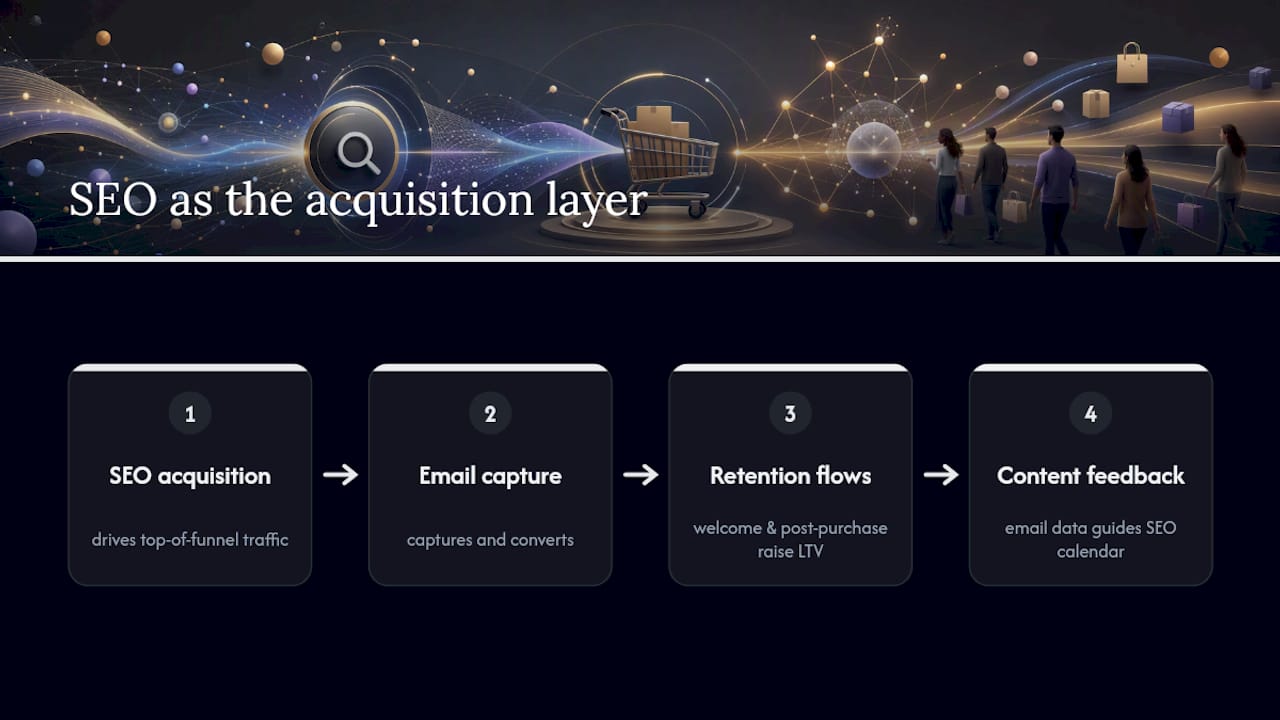
Most ecommerce brands treat SEO as a standalone channel. That’s a mistake. Organic search is where new customers find you; email and retention are how you make that acquisition profitable.
The math is straightforward. A visitor who lands on a buying guide, reads it, and subscribes to your email list is worth far more than one who bounces after a single session. SEO drives the top-of-funnel traffic; email captures and converts it over time. A well-timed welcome flow that references the content a subscriber first engaged with — a buying guide, a product comparison — converts at a meaningfully higher rate than a generic welcome sequence.
Post-purchase flows extend this further. A customer who found you through organic search, bought once, and then received a well-sequenced post-purchase email series has a substantially higher lifetime value than one who bought and never heard from you again. The SEO investment that acquired them becomes more defensible when retention systems are in place to monetize repeat behavior.
There’s also a feedback loop that most teams miss. Email engagement data tells you which products and content topics resonate most with your audience. That data should feed back into your SEO content calendar. If your email list clicks heavily on content about a specific product category, that’s a signal to invest more SEO resources in that category — not just because it converts, but because engaged audiences tend to share and link to content they find genuinely useful.
The brands that win long-term in organic search aren’t the ones with the most backlinks or the most content. They’re the ones that treat SEO as the acquisition layer of a retention-first growth model. Organic traffic is expensive to earn and cheap to keep if you have the right systems downstream.
How email retention turns your SEO traffic into lasting revenue
Organic search brings buyers to your store. What happens next determines whether that traffic pays for itself.
Take-action specializes in turning one-time organic visitors into repeat buyers through Klaviyo-powered email flows built specifically for ecommerce brands. The connection to SEO is direct: a visitor who finds your store through a buying guide or a category page is already in research mode. A well-timed welcome flow that matches their intent — referencing the product category they browsed, offering a relevant incentive — captures that intent before a competitor does.
The result is a shorter payback window on your SEO investment. Instead of waiting months for organic traffic to compound into revenue, retention flows convert and re-engage visitors from day one. Abandoned cart sequences, post-purchase upsells, and browse abandonment emails all work harder when the traffic feeding them is high-intent organic traffic rather than cold paid traffic.
If you’re investing in SEO and not yet capturing and retaining that traffic through email, you’re leaving the most valuable part of the equation unfinished. See how Take-action helps ecommerce brands close that gap.
Sources
The resources below are worth bookmarking for implementation and ongoing reference:
Official documentation:
- eCommerce SEO Ranking Factor Study 2026
Sector studies and practical guides:
Audit and monitoring tools: