

Prevent Selector Errors: DKIM for Email Audits and Setup
DKIM (DomainKeys Identified Mail) is an email authentication standard defined in RFC 6376 that uses a private and public key pair to cryptographically sign outgoing messages. A private key signs the mail before it leaves your server; the matching public key sits in your domain’s DNS records so any receiving mailbox can verify that signature. If it checks out, the receiver knows the message came from an authorized sender and wasn’t altered in transit.
TL;DR:
- Most DKIM failures are caused by selector typos or DNS records that haven’t been updated properly after key rotation.
- Longer RSA keys are recommended for security, but they can pose DNS record size challenges; ongoing key rotation should include overlapping DNS records for at least a week.
- DKIM’s effectiveness depends on maintaining consistency in headers and avoiding message alterations after signing, as modifications break verification.
- DKIM alone doesn’t guarantee email legitimacy; it must be combined with SPF and DMARC, especially considering forwarding scenarios where SPF can fail but DKIM still passes.
- Proper DKIM setup requires inventorying all sending platforms, regular DNS and key management, and monitoring through DMARC reports to ensure reliable deliverability.
Table of Contents
- What Is DKIM in Email, Exactly? The Signing and Verification Flow
- The DKIM-Signature Header and DNS Record, Decoded
- Key Length, Rotation, and Who Should Hold the Private Key
- How DKIM, SPF, and DMARC Work Together
- What DKIM Actually Proves (and Where It Stops)
- Setting Up DKIM: A Practical Sequence for Domain Owners
- Why DKIM Fails: A Diagnostic Checklist
- Why Ecommerce Brands Can’t Treat DKIM as Optional
- What DKIM Setup Should Not Feel Like
- Sources
What Is DKIM in Email, Exactly? The Signing and Verification Flow
DKIM works in two separate acts: signing on the way out, verification on the way in. Neither step involves the person hitting “send.” It happens entirely inside the mail infrastructure, which is why most people who’ve used email for twenty years have never heard the term.
Here’s the sequence a message actually goes through:
- Header and body selection. The sending server picks which headers to sign (commonly
From,Date,Subject,To) and hashes the message body. - Body hashing. That hash gets computed using an algorithm like SHA-256 and stored as the
bh=value. - Signing with the private key. The server takes the selected headers plus the body hash and signs the whole bundle with its private key.
- Header insertion. The result gets dropped into a new header field called
DKIM-Signature, attached to the outgoing message. - DNS lookup on arrival. The receiving server reads the
DKIM-Signatureheader, extracts the domain and selector, and queries DNS for the corresponding public key. - Hash recomputation. It recomputes the hash of the headers and body it actually received.
- Signature comparison. It decrypts the signature using the public key and compares the result against its own recomputed hash. Match means
dkim=pass. Mismatch meansdkim=fail.
That last step is where things get interesting for anyone troubleshooting deliverability. Proofpoint’s explainer on DKIM frames this correctly: DKIM lets an organization take responsibility for a message by signing it, giving mailbox providers a cryptographic way to check that claim rather than trusting it blindly. And because DKIM operates at the infrastructure level, not the client, you’ll never see a “signed” badge in your inbox. The verification result lives in the raw headers, in a field called Authentication-Results, which almost nobody reads unless something breaks.
One detail trips people up constantly: DKIM only validates the exact bytes it signed. If a forwarding service rewrites the subject line, injects a footer, or reformats whitespace in the body after signing, verification fails, even though the original message was completely legitimate.
The DKIM-Signature Header and DNS Record, Decoded
Open the raw source of any signed email and you’ll see a header block that looks like cipher text. It isn’t random. Each tag carries specific meaning, and once you know the shorthand, the whole thing reads like a manifest.
- v= — protocol version (almost always
1) - d= — the signing domain (this is what gets checked for alignment with DMARC)
- s= — the selector, which points to which key was used
- h= — the list of headers that were signed
- bh= — the base64-encoded hash of the message body
- b= — the actual signature value, also base64-encoded
The public half of that key pair lives in a DNS TXT record with a specific naming pattern: selector._domainkey.example.com. Inside that record sits a p= tag holding the base64-encoded public key itself. When a receiving server sees s=jan2026 in a DKIM-Signature header for example.com, it queries jan2026._domainkey.example.com and pulls whatever public key is published there.
Selectors exist because domains rarely sign mail from just one source. A company might use one selector for its transactional emails, another for its marketing platform, and a third for internal mail servers, each with its own key. This also lets a domain rotate keys without downtime: publish a new selector, start signing with it, and retire the old one once you’re confident it’s no longer in use. RFC 6376 notes selectors are what makes multiple concurrent signing keys possible in the first place. The most common real-world DKIM failure isn’t a cryptography problem at all. It’s a selector typo, or a selector that got deleted from DNS while a mail platform kept signing with it anyway, resulting in a public key lookup that returns nothing.
Key Length, Rotation, and Who Should Hold the Private Key
RSA key length matters more than most setup guides admit. RSA key length matters more than most setup guides admit. Historically shorter keys were used but are now considered weak; current guidance recommends stronger keys, and it’s worth checking your ESP’s documentation for their current defaults before assuming they’re set correctly. Longer keys mean more DNS TXT record characters, which occasionally runs into record-size limits on older DNS providers, but that’s a configuration problem, not a reason to skip it.

Rotation is where key management actually gets tested. The safe pattern: publish a new selector with the new public key, switch signing over to it, and leave the old selector live in DNS for several days. Inbox providers cache DNS lookups, and mail already in transit was signed with the old key, so pulling the old record too soon breaks verification on mail that’s still landing.
Most brands using an ESP like Klaviyo or Mailchimp never touch a private key directly; the platform generates and rotates keys behind the scenes. Self-hosting your own mail server means you own that responsibility, and losing a private key isn’t a minor inconvenience. It means regenerating the pair and republishing DNS.
Pro Tip: Never let the old selector’s DNS record disappear the same day you switch signing keys. Give it at least a week of overlap so cached lookups and delayed mail still verify correctly.
How DKIM, SPF, and DMARC Work Together
DKIM doesn’t work alone, and treating it as a complete solution is a common mistake. Each of the three major email authentication standards checks a different thing:
- SPF verifies which IP addresses are authorized to send mail for a domain.
- DKIM verifies message integrity and confirms which domain actually signed it.
- DMARC enforces alignment between those two checks and tells receivers what to do when they fail.
The gap that trips people up: DKIM can pass while SPF fails, and that’s not always a red flag. Forwarding is the classic case. When a message gets relayed through an intermediary, the sending IP changes, which breaks SPF, but the DKIM signature travels with the message and often still verifies fine. Microsoft’s authentication documentation points out that this is exactly why DKIM tends to survive forwarding better than SPF does, which is one reason DMARC leans on DKIM alignment as a fallback path rather than requiring both checks to pass simultaneously.
For legitimate forwarding scenarios that would otherwise break both checks, there’s ARC (Authenticated Received Chain), which lets intermediate servers attach a record showing the original authentication results so the final receiver can still trust the chain.
What DKIM Actually Proves (and Where It Stops)
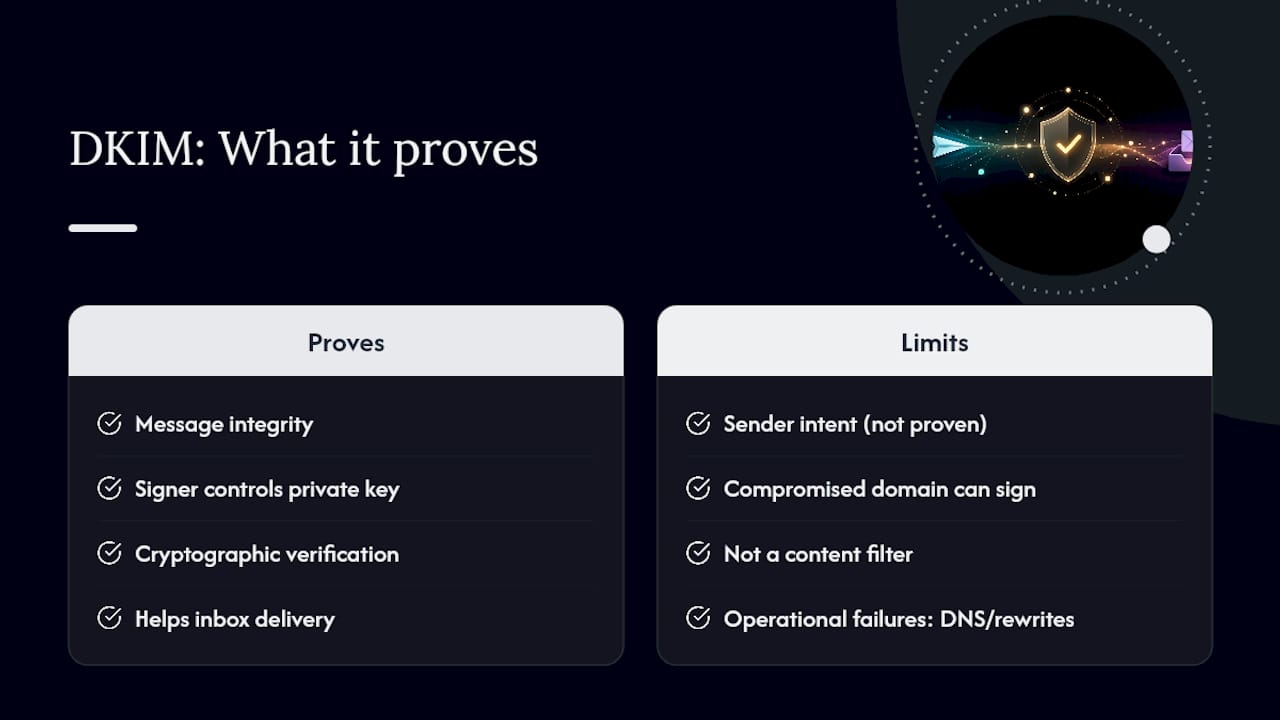
DKIM proves two things and nothing more: the message wasn’t altered after signing, and it was signed by whoever controls the private key for that domain. That’s real, verifiable, cryptographic proof, and it’s the reason major inbox providers effectively require DKIM for bulk senders before they’ll deliver mail to the inbox instead of the spam folder.
What it doesn’t prove is intent. A domain can be entirely legitimate on paper and still get compromised, and a signed message from a compromised domain still passes DKIM. It just also happens to be a phishing email.
A valid DKIM signature confirms authorization and integrity. It says nothing about whether the sender’s purpose is honest, or whether the domain itself has been compromised by someone with access to the signing key.
M3AAWG’s technical summaries make this distinction explicit: DKIM is a trust mechanism for domain identity, not a content filter, and it was never designed to catch malicious intent. Beyond that, DKIM has operational failure points that have nothing to do with security. Overly strict header canonicalization, a caching DNS resolver serving stale records, or a mail gateway that rewrites a signed header in transit will all break verification on a perfectly legitimate message.
Setting Up DKIM: A Practical Sequence for Domain Owners
Before touching DNS, get a full inventory. Every platform sending mail for your domain, your transactional email service, your marketing ESP, your CRM, your helpdesk, needs its own signing setup or it’ll show up unauthenticated.
- List every mail source. Marketing platform, transactional service, internal SMTP relays, help desk, anything that sends as your domain.
- Generate or enable signing. Most ESPs generate the key pair for you; self-hosted setups require generating an RSA key pair manually.
- Choose a selector and publish the public key. Add a TXT record at
selector._domainkey.yourdomain.comcontaining thep=value. - Configure signing and test. Point the sending platform to the private key, send a test message, and check the
Authentication-Resultsheader fordkim=pass. - Layer on DMARC once DKIM and SPF are stable. Start with a monitoring-only policy (
p=none) and review reports before moving to enforcement.
| Step | What you’re confirming | Common tool |
|---|---|---|
| DNS record published | TXT record resolves at the correct selector path | dig txt selector._domainkey.yourdomain.com |
| Signature present | Outgoing mail carries a DKIM-Signature header |
Raw email source / header viewer |
| Verification passes | Receiving server returns dkim=pass |
Authentication-Results header |
| DMARC alignment | d= domain matches the visible From domain |
DMARC aggregate reports |
Why DKIM Fails: A Diagnostic Checklist
When mail starts landing in spam or Authentication-Results shows dkim=fail, work through this in order rather than guessing.
- Query the selector’s TXT record directly and confirm it returns a valid
p=value, not an empty or missing response. - Check DNS propagation and TTL. A recently rotated key may not have reached every resolver yet.
- Compare the
h=list against what the receiving server actually saw. If an intermediary reordered or altered a signed header, verification breaks even though the message content is unchanged. - Look for
permerrorin the authentication results, which usually means the DNS lookup itself failed, not the cryptography. - Confirm no forwarding or relay service is stripping and reinserting headers after signing.
Online DKIM checker tools exist for exactly this purpose, letting you paste in a domain and selector to see whether the public key resolves cleanly before you go hunting through server logs.
Why Ecommerce Brands Can’t Treat DKIM as Optional
Bulk senders live or die by inbox placement, and DKIM has quietly become table stakes for that. A welcome flow, an abandoned cart sequence, a post-purchase series, these all run through automated platforms that need to sign consistently across every campaign type or providers start treating the volume as suspicious.
The operational risk most brands don’t see coming: template systems and third-party marketing platforms sometimes modify headers after the signing step, especially when personalization tokens get injected late in the send pipeline. That’s a real failure mode worth testing for, not a theoretical one, and it’s part of why Klaviyo deliverability issues often trace back to authentication gaps rather than content or reputation problems.
For a brand running five or six active flows through one ESP, a single misconfigured selector can quietly tank inbox placement across every one of them at once, not just the campaign where the mistake happened.
Brands without in-house DNS or infrastructure expertise have a reasonable option here: hand the configuration to a team that manages it daily. That’s a fair trade-off for anyone who’d rather spend engineering hours on the product than on DNS records.
What DKIM Setup Should Not Feel Like
Getting DKIM right isn’t a one-time DNS entry you forget about. It’s ongoing key hygiene, selector discipline across every platform touching your domain, and honest monitoring through DMARC reports rather than assuming it’s working because nothing obviously broke. Start with a full inventory of sending sources before touching a single TXT record. If your team doesn’t have someone who owns DNS changes and reads authentication headers regularly, that’s the point to bring in outside help rather than after deliverability has already dropped. Take-action builds this into every Klaviyo implementation it manages, because unsigned or misconfigured mail is the quietest revenue leak in ecommerce.
— Take
Getting DKIM configured correctly across every sending platform your domain touches is exactly the kind of infrastructure work that’s easy to postpone and expensive to ignore. Take-action treats authentication setup as part of the foundation for any Klaviyo program it manages, alongside flow strategy, segmentation, and campaign calendars, because deliverability problems upstream undo good copywriting downstream. If your welcome flows or abandoned cart sequences have been landing inconsistently, or you’re not sure your selectors are even current, Take-action’s email marketing services start with exactly this kind of audit before touching a single subject line. For teams looking at broader deliverability fixes beyond authentication, the ecommerce email marketing guide and this rundown of common deliverability mistakes cover the operational side, while ready-to-send campaign templates are worth a look once your sending infrastructure is verified and stable.