

Klaviyo Deliverability: What It Is and How to Fix It
TL;DR:
- Klaviyo deliverability refers to the likelihood that emails land in the recipient’s primary inbox rather than spam or rejection.
- Improving it requires authenticating your domain, maintaining list hygiene, and engaging your audience regularly.
Klaviyo deliverability is the likelihood that emails sent through Klaviyo land in a recipient’s primary inbox rather than the spam folder or getting blocked entirely. Klaviyo defines it as inbox placement after an email is successfully delivered to the recipient’s mail server — and that distinction from simple “delivery” matters more than most senders realize. Three actions to take right now:
- Connect a branded sending domain in your Klaviyo account settings
- Open the Deliverability Hub and review your account-level health score
- Segment or suppress contacts who have not engaged in the past 90 days
Table of Contents
- What Klaviyo deliverability actually means (and why delivery isn’t the same thing)
- Core factors that drive Klaviyo inbox placement
- How to configure Klaviyo’s infrastructure settings first
- Deliverability best practices in Klaviyo: warming, hygiene, segmentation, and content
- How to monitor deliverability in Klaviyo and the metrics that matter
- Common deliverability problems in Klaviyo and how to fix them
- A practical warm-up calendar and weekly checklist you can use today
- Key Takeaways
- The engagement-first case most senders ignore
- How Take-action can improve your Klaviyo deliverability
- Useful sources and further reading for Klaviyo senders
What Klaviyo deliverability actually means (and why delivery isn’t the same thing)
Delivery is the server handshake. When Klaviyo sends a message and the receiving mail server accepts it, that counts as a delivered email — even if it lands directly in spam. Deliverability is what happens next: where does the message actually appear?
Gmail, Yahoo, and Outlook each run their own filtering systems that weigh dozens of signals before routing a message to the inbox, the promotions tab, or the junk folder. Those signals include authentication records, your historical engagement rates, how quickly your volume grew, and whether recipients have been marking similar messages as spam. A sender can hit a 99% delivery rate and still have most messages routed to spam if engagement has been consistently low.
The practical implication: your Klaviyo campaign reports can show a clean delivery number while your actual inbox placement is quietly deteriorating. That gap is exactly what Klaviyo deliverability monitoring is designed to catch.
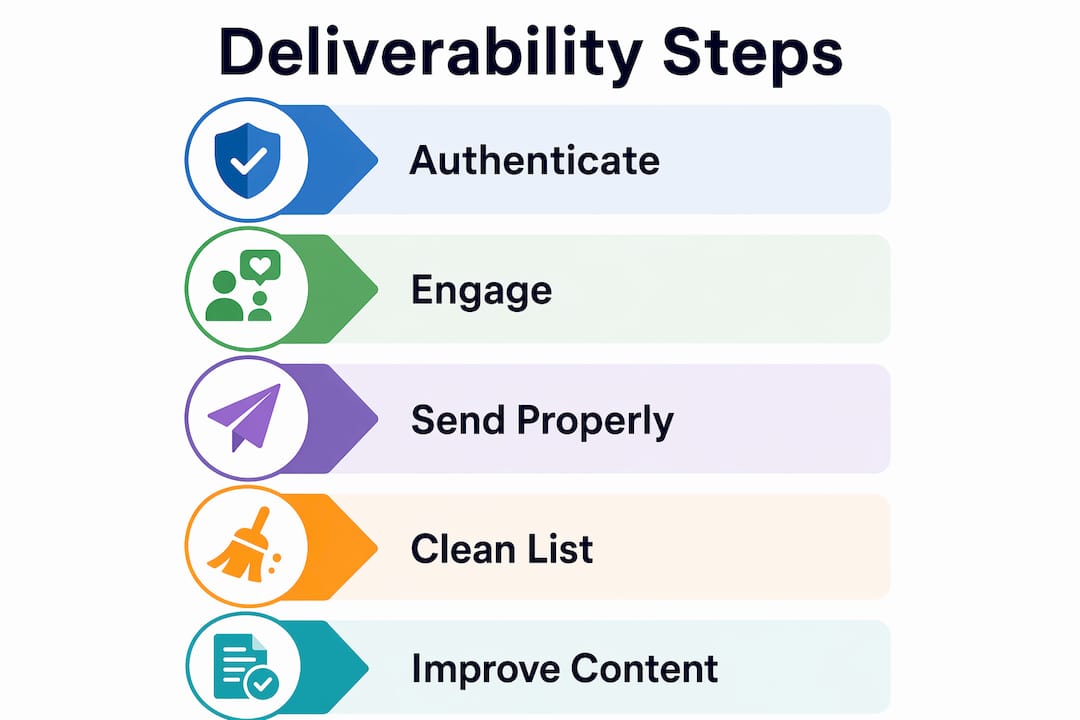
Core factors that drive Klaviyo inbox placement
Several distinct layers determine whether your messages reach the inbox. Weakness in any one of them can drag down the others.
Authentication: SPF, DKIM, DMARC, and BIMI
SPF (Sender Policy Framework) tells receiving servers which IP addresses are authorized to send mail on behalf of your domain. DKIM (DomainKeys Identified Mail) adds a cryptographic signature to each message so the receiving server can verify it hasn’t been tampered with. DMARC (Domain-based Message Authentication, Reporting, and Conformance) ties SPF and DKIM together and tells providers what to do when a message fails both checks — quarantine it, reject it, or let it through.

BIMI (Brand Indicators for Message Identification) sits on top of a valid DMARC policy and lets you display your brand logo in supported inboxes like Gmail. It’s a trust signal, not a core authentication requirement, but it’s increasingly worth implementing once DMARC is solid.
Connecting a branded sending domain is the prerequisite for all of this. Without it, your reputation is tied to Klaviyo’s shared infrastructure, which means another sender’s bad behavior can affect your inbox placement.
Engagement signals
Mailbox providers watch how recipients interact with your mail. Opens, clicks, replies, and forwards all signal that your messages are wanted. Low engagement over time tells providers to start routing your mail lower in the inbox or into spam. Flow efficiency and relevance consistently outperform raw send volume for sustainable deliverability — a smaller, highly engaged list will outperform a massive, disengaged one every time.
Sending behavior
Volume spikes are a red flag. If you normally send 5,000 emails per week and suddenly blast 200,000, providers treat that as suspicious. New sending domains need a warm-up period where volume increases gradually over several weeks. Even established senders can trigger throttling by jumping volume too fast.
List hygiene
Hard bounces, spam complaints, and unsubscribes all damage sender reputation. Sending to dormant subscribers without a sunset policy is one of the fastest ways to erode your standing with inbox providers. Double opt-in at acquisition is the cleanest way to prevent the problem from building in the first place.

Content factors
Spam filters scan message content for trigger phrases, suspicious link domains, and poor image-to-text ratios. Personalization helps because relevant content drives engagement, and engagement is what providers actually measure. A message that reads like a broadcast to everyone performs worse than one that feels written for the recipient.
Pro Tip: When multiple factors are weak at once, fix authentication first. A missing or broken DMARC record can cause providers to distrust everything else you do, regardless of how good your content or list hygiene is.
| Factor | Impact Level | Quick Fix |
|---|---|---|
| Authentication (SPF/DKIM/DMARC) | Critical | Set up branded domain; add DMARC record to root domain |
| Engagement rate | High | Suppress unengaged contacts; prioritize active segments |
| Sending volume spikes | High | Warm up new domains; throttle large sends |
| List hygiene | High | Prune hard bounces; run re-engagement flows |
| Content quality | Medium | Avoid spam trigger phrases; balance image-to-text ratio |
| BIMI | Low-Medium | Implement after DMARC is validated |
How to configure Klaviyo’s infrastructure settings first
Getting the technical foundation right before you focus on content or cadence is the right order of operations. Klaviyo handles the sending infrastructure and shared domain defaults, but the DNS records, branded domain, and list management are your responsibility.
Branded sending domain. In Klaviyo’s account settings, connect a subdomain of your brand’s domain (e.g., mail.yourbrand.com) as your sending domain. This isolates your sender reputation from other Klaviyo users. Shared sending domains tie your reputation to everyone else on that infrastructure.
SPF and DKIM. Once your branded domain is connected, Klaviyo generates the DNS records you need to add at your domain registrar. SPF authorizes Klaviyo’s servers to send on your behalf; DKIM signs each outgoing message. Both need to be verified in Klaviyo before sending.
DMARC. Add a DMARC TXT record to your root domain (not the subdomain). Start with p=none to monitor without blocking, then move to p=quarantine or p=reject once you’ve confirmed your legitimate mail streams are passing authentication.
Dedicated click tracking. By default, Klaviyo routes tracked links through a shared Klaviyo domain. Setting up dedicated click tracking with your branded domain means recipients see your brand name when they hover over links, which increases trust and click rates.
Deliverability Hub. The Deliverability Hub in Klaviyo centralizes account-level deliverability health. Check it regularly — it surfaces engagement trends, bounce patterns, and spam complaint signals before they become lasting reputation damage.
Bulk sender requirements from Google and Yahoo: Both providers now require bulk senders to use branded sending domains and place unsubscribe links at both the top and bottom of marketing emails. Failing to meet these requirements increases spam complaint rates and can trigger filtering at scale. If you’re sending to Gmail or Yahoo addresses in volume — and you almost certainly are — these aren’t optional.
Deliverability best practices in Klaviyo: warming, hygiene, segmentation, and content
Warming a new sending domain
A new domain has no reputation history, so inbox providers treat it with skepticism. The goal of warming is to build a positive engagement record gradually.
- Days 1–7: Send to your most engaged contacts only (opened or clicked in the last 30 days). Keep daily volume low during initial warming phases.
- Days 8–14: Expand to contacts engaged in the last 60 days. Volume can increase gradually as engagement rates stay strong.
- Days 15–21: Include contacts engaged in the last 90 days. Daily volume can be further increased with continued strong engagement.
- Days 22–28: Broaden to 120-day engaged contacts. Volume can reach higher levels after sustained engagement and monitoring.
Stop or slow down if bounce rates climb above 1% or spam complaints spike. Pushing through bad signals during warm-up compounds the reputation damage.
List acquisition and hygiene
- Use double opt-in for all new subscribers. It confirms intent and filters out mistyped addresses before they become bounces.
- Never import purchased lists. Even if the addresses are real, those contacts never consented to hear from your brand, and the spam complaint rate will reflect that.
- When importing historical contacts from another platform, segment them by recency of engagement and warm them up the same way you would a new domain.
- Suppress unsubscribes globally across all lists, not just the list they opted out of.
Pruning and re-engagement
Run a re-engagement flow for contacts who haven’t opened or clicked in 90–120 days before suppressing them. A three-email sequence works well: a “we miss you” message, a second with a stronger incentive, and a final “last chance” email that makes clear they’ll be removed if they don’t engage. Contacts who don’t respond get suppressed, not deleted — you keep the record but stop sending.
Prune your list every 30–60 days. Waiting six months to clean a list means months of reputation damage from low engagement. For segmentation strategies that keep your active cohorts sharp, the principle is the same: send to people who want your mail.
Segmentation for deliverability
Target your most engaged cohorts first for any new campaign or flow. Klaviyo makes it straightforward to build segments based on open and click behavior over rolling time windows. Starting sends with high-engagement segments builds positive signals before you expand to less-active contacts. This is especially useful when launching a new campaign type or testing a new content format.
Content hygiene
- Test subject lines before sending at scale. High open rates on the first send signal relevance to inbox providers.
- Avoid spam trigger phrases (“FREE!!!”, “Act now”, excessive capitalization). Modern spam filters are more sophisticated than a keyword list, but these patterns still correlate with low engagement.
- Keep image-to-text ratios balanced. An email that’s 90% images with minimal text is harder for filters to evaluate and often performs worse.
- Place unsubscribe links at both the top and bottom of every marketing email — this is now a Google and Yahoo requirement for bulk senders.
- Keep HTML file sizes reasonable. Oversized emails get clipped in Gmail, which cuts off your content and your unsubscribe link.
How to monitor deliverability in Klaviyo and the metrics that matter
The Deliverability Hub is your primary monitoring tool inside Klaviyo. It gives you an account-level view of deliverability health and flags issues before they become entrenched. Supplement it with Google Postmaster Tools, which shows domain reputation and spam rate data directly from Gmail’s perspective.
| Metric | What Klaviyo reports | Threshold to watch | Action if threshold crossed |
|---|---|---|---|
| Open rate | Per campaign and flow | Aim for at least 33% | Segment more tightly; suppress unengaged contacts |
| Bounce rate | Hard and soft bounces per send | Keep below 1% | Remove hard bounces immediately; investigate soft bounce patterns |
| Spam complaint rate | Complaints per delivered email | Keep below 0.01% | Pause sends; audit content and list quality immediately |
| Unsubscribe rate | Unsubscribes per campaign | Keep below 0.3% per campaign | Review content relevance and send frequency |
| Block rate | Emails blocked by provider | Any sustained increase | Check DNS authentication; review sending patterns |
Check campaign-level reports after every send. A single campaign with a spike in spam complaints can affect your sender reputation for weeks. Checking the Deliverability Hub weekly — not just when something looks wrong — is the difference between catching a problem early and doing damage control.
Pro Tip: Set up Google Postmaster Tools for your sending domain. It’s free and gives you Gmail-specific domain reputation data that Klaviyo’s internal reporting can’t surface. A “Low” or “Bad” domain reputation in Postmaster is a direct signal that Gmail is routing your mail to spam.
Common deliverability problems in Klaviyo and how to fix them
Sudden drop in open rates
This is usually the first visible symptom of a deliverability problem. Before assuming it’s a content issue, check whether the drop is provider-specific. If Gmail open rates fell but Yahoo held steady, the problem is likely Gmail-specific filtering or a domain reputation issue visible in Postmaster Tools.
- Check the Deliverability Hub for any new warnings
- Run a DNS check on your SPF, DKIM, and DMARC records (MXToolbox works well for this)
- Look at whether a recent large send preceded the drop
Rising bounce rates
Hard bounces above 1% require immediate action. Remove all hard-bouncing addresses from your active lists. If the bounce rate spiked after importing a new list, that list likely contains stale or invalid addresses.
- Suppress all hard bounces immediately
- Investigate the source of the bouncing addresses
- Pause sends to that segment until the source is cleaned
Spike in spam complaints
Spam complaint rates above 0.01% are serious. Inbox providers share complaint data with each other, and a sustained spike can damage your reputation across all providers, not just the one where complaints originated.
- Pause the campaign or flow that generated the complaints
- Audit the content for relevance and frequency
- Check whether the affected segment was recently imported or hasn’t engaged in months
- Add a prominent unsubscribe link at the top of future sends
Authentication failures
If Klaviyo flags an authentication issue, go to your domain registrar and verify that your SPF, DKIM, and DMARC records are correctly published. A common mistake is adding a second SPF record instead of updating the existing one — domains can only have one SPF record.
When to pause sending or contact support
Pause sending when spam complaints are climbing and you haven’t identified the cause, when bounce rates exceed 2%, or when a major provider appears to be blocking your domain entirely. Contact Klaviyo’s deliverability support team when you’ve addressed the obvious technical issues and inbox placement still hasn’t recovered after two to three weeks.
A practical warm-up calendar and weekly checklist you can use today
28-day warm-up plan
| Week | Daily send volume | Segment target | Engagement gate |
|---|---|---|---|
| Week 1 (Days 1–7) | — | Opened or clicked in last 30 days | Pause if bounce >0.5% or complaints appear |
| Week 2 (Days 8–14) | — | Engaged in last 60 days | Pause if bounce >1% |
| Week 3 (Days 15–21) | Up to 5,000/day | Engaged in last 90 days | Monitor open rate; stay above 33% |
| Week 4 (Days 22–28) | — | Engaged in last 120 days | Full review before expanding further |
Weekly monitoring checklist
- Open the Deliverability Hub and check for any new warnings or score changes
- Review bounce rate and spam complaint rate for all sends in the past 7 days
- Check Google Postmaster Tools for domain reputation status
- Identify any contacts who have not engaged in 90+ days and add them to your re-engagement segment
- Confirm that any new list imports have been segmented by engagement recency before sending
Re-engagement flow outline
A three-step sequence handles most re-engagement scenarios:
- Email 1: Sent at day 0 of the flow. Subject line variation: “We haven’t heard from you” or “Still interested?” Soft tone, no hard sell.
- Email 2: Sent 5 days later if no open or click. Include a meaningful incentive (discount, exclusive content). Subject line: “Here’s something for you.”
- Email 3: Sent 5 days after Email 2 if still no engagement. Final notice: “We’ll remove you from our list unless you’d like to stay.” Make the opt-in action explicit.
Contacts who don’t engage with any of the three emails get suppressed. This protects your sender reputation and keeps your Klaviyo flows targeting people who actually want to hear from you.
Pro Tip: Run your re-engagement flow before any major campaign push, not after. Suppressing unengaged contacts before a large send protects your reputation on that send, rather than cleaning up the damage afterward.
Legal compliance note
CAN-SPAM requires a physical mailing address and a working unsubscribe mechanism in every commercial email sent to US recipients. GDPR applies if you’re emailing contacts in the EU and requires a lawful basis for processing. Both frameworks reinforce the same practical behavior: send only to people who consented, honor unsubscribes promptly, and keep your list clean. This article is general information, not legal advice — confirm your specific compliance obligations with a qualified professional.
Key Takeaways
Klaviyo deliverability depends on authentication, list hygiene, and consistent engagement — fix authentication first, then clean your list, then optimize content and cadence.
| Point | Details |
|---|---|
| Authentication is the foundation | Set up SPF, DKIM, and DMARC on your branded sending domain before anything else. |
| Engagement beats volume | Sending to a smaller, active list consistently outperforms blasting a large, disengaged one. |
| Monitor weekly, not monthly | Check the Deliverability Hub and Google Postmaster Tools every week to catch issues early. |
| Prune every 30–60 days | Suppress contacts with no engagement in 90+ days to protect sender reputation. |
| Take-action handles the full setup | Take-action provides deliverability audits, DNS configuration, warm-up programs, and ongoing monitoring for Klaviyo senders. |
The engagement-first case most senders ignore
Most deliverability advice focuses on the technical layer: get your DNS records right, warm up your domain, don’t buy lists. That’s all correct. But the senders who consistently land in the inbox aren’t just technically compliant — they’ve built lists where people actually want to open the mail.
The data from flow-dominant Klaviyo accounts makes this concrete. Accounts that generate more revenue from automated, behavior-triggered flows than from broadcast campaigns send far fewer emails yet earn significantly more per email. That’s not a coincidence. Behavior-triggered flows reach people at the moment they’re most likely to engage, which means higher open and click rates, which means inbox providers learn to trust the sender’s domain.
The conventional wisdom treats deliverability as a technical problem with a technical solution. The reality is that inbox placement is a reputation problem, and reputation is built on whether recipients find your mail worth opening. A perfectly authenticated domain sending irrelevant mail to a stale list will still end up in spam. The technical setup creates the conditions for good deliverability; the engagement strategy is what sustains it.
For brands that want to get this right without spending months figuring it out, working with an agency that lives inside Klaviyo every day shortens the learning curve considerably.
How Take-action can improve your Klaviyo deliverability
Most ecommerce brands running Klaviyo have the same gap: the technical setup is incomplete, the list hasn’t been pruned in months, and the flows are either missing or sending to everyone regardless of engagement. The result is a sender reputation that’s slowly eroding while the campaign reports still look fine.
Take-action audits your entire Klaviyo account, from DNS authentication and Deliverability Hub signals to list segmentation and flow architecture. The work covers branded domain setup, SPF/DKIM/DMARC configuration, warm-up programs for new domains, re-engagement flow builds, and ongoing deliverability monitoring. The goal is a Klaviyo program where inbox placement is protected, complaint rates stay well below threshold, and flows are doing the revenue work that broadcast campaigns can’t.
If your open rates have been sliding or you’ve never fully configured your sending domain, book a deliverability audit with Take-action and get a clear picture of where the gaps are and how to close them.
Useful sources and further reading for Klaviyo senders
The resources below are the most authoritative references for Klaviyo deliverability in the US market. Klaviyo-owned documentation reflects current platform behavior; Google Postmaster Tools is a primary-source monitoring tool directly from Gmail.
- Understanding email deliverability (Klaviyo Help Center) — Core definition of deliverability vs. delivery; the starting point for any Klaviyo sender.
- Email deliverability best practices reference (Klaviyo Help Center) — Covers branded sending domains, SPF/DKIM setup, dedicated click tracking, and open-rate benchmarks.
- Troubleshooting why emails go to spam (Klaviyo Help Center) — Practical thresholds for bounce rate, spam complaints, and unsubscribe rate; includes Google and Yahoo bulk-sender requirements.
- Deliverability Hub guide (Klaviyo Help Center) — How to use Klaviyo’s account-level deliverability monitoring tool.
- How to reduce spam complaint rates (Klaviyo Help Center) — Focused guide on diagnosing and lowering spam complaint rates.
- Deliverability glossary (Klaviyo Help Center) — Definitions for core deliverability terms used across Klaviyo’s platform.
- Google Postmaster Tools — Free Gmail-specific domain reputation monitoring; essential for any sender with significant Gmail volume in the US.
US-market note: Gmail and Yahoo together account for the majority of consumer email addresses in the United States. Their bulk-sender requirements — branded sending domains, one-click unsubscribe, and complaint-rate thresholds — set the practical floor for any serious Klaviyo sender targeting US recipients.