

How to Write Subject Lines That Actually Get Opened
The best subject lines are short, specific, and promise a clear benefit. Everything else is refinement.
Before you read further, here is the core rule set you can apply right now:
- Keep it under 40 characters for mobile-first audiences; up to 60 characters works for desktop-heavy lists.
- Lead with the benefit or the point, not a greeting or your brand name.
- Use sentence case, not ALL CAPS or Title Case For Every Word.
- Pair with preview text that extends the thought rather than repeating it.
- Avoid spam-trigger words like “free,” “guarantee,” and “act now.”
- Never fake a reply thread with “Re:” or “Fwd:” unless it is a real thread.
Get those six right and your open rates will reflect it.
Key Takeaways
Writing effective subject lines comes down to one repeatable discipline: match the line’s length, tone, and specificity to the email’s goal and the reader’s context.
| Point | Details |
|---|---|
| Match length to goal | Under 25 characters wins opens; 25–35 characters often drives better conversions when context matters. |
| Personalize triggered flows | Use name or product tokens in welcome and cart-abandonment emails; skip them in broad campaign sends. |
| Clarity over cleverness | Subject lines that state the benefit or content specifically outperform vague or clever hooks. |
| Test human open rate first | Measure unique human opens within 24 hours; track CTR and revenue per send after. |
| Take-action for complex sends | When segmentation and automation are the bottleneck, Take-action’s Klaviyo-focused agency work addresses the root cause. |
Table of Contents
- What does a strong subject line actually do?
- How to write subject lines: practical rules that hold up
- Subject line examples and templates by use case
- How to draft and finalize a subject line, step by step
- How to A/B test subject lines and what to measure
- What the research says about subject lines
- Common mistakes that hurt opens and deliverability
- What email pros actually do differently
- When professional help is worth it
- Sources
What does a strong subject line actually do?
A subject line has one job: earn the click to open. It does that by checking five boxes before the reader’s thumb moves on.
- Conveys clear value — the reader knows what is inside before opening.
- Sets an accurate expectation — the email delivers exactly what the subject line promised.
- Signals urgency only when it is real — manufactured urgency trains readers to ignore you.
- Fits the mobile preview window — roughly 30–40 characters show on most locked screens.
- Pairs with preview text that adds information, not a repeat of the subject line.
The sender name matters as much as the subject line itself. A recognizable, trusted sender name can lift opens even when the subject line is average. Personal branding in email — the name readers see before they read a single word — is one of the most underused levers in email marketing.
Both Mailchimp and MailerLite surface subject-line helpers directly inside their campaign builders, including character counters and preview-text fields, so you can check both elements before you schedule.
Pro Tip: Write your preview text before you finalize the subject line. If the preview text ends up repeating the subject line word-for-word, rewrite one of them. They should work as a two-part sentence, not an echo.
How to write subject lines: practical rules that hold up
These are not abstract guidelines. Each one has a clear “when to use it” and a clear “when to break it.”
-
Keep it short, but match length to goal. Attentive’s analysis of billions of subject lines found that short lines (under 25 characters) tend to win on raw open rate, while medium-length lines (25–35 characters) often drive better conversions when the email needs context. For a flash sale, go short. For a product launch with a story, 30 characters is fine.
-
Personalize triggered emails; be cautious with broadcast campaigns. Mailchimp’s guidance is direct: personalization works best in triggered automations like welcome flows, cart-abandonment reminders, and post-purchase sequences. In broad campaign sends, a first-name token often adds no measurable lift and can feel hollow. Use personalized email templates where the context genuinely supports them.
-
Use sentence case or lowercase. Sentence case reads as natural and human. Lowercase can feel conversational and direct, which works well for plain-text-style emails. ALL CAPS reads as shouting and triggers spam filters. Title Case For Every Word feels like a press release from 2009.
-
Avoid spam-trigger words and excessive punctuation. Words like “free,” “guarantee,” “winner,” and “act now” are associated with lower performance and spam complaints, per ReachIQ’s B2B email research. Multiple exclamation points and dollar signs in the same line compound the problem. One exclamation point, used sparingly, is fine. Three is a red flag.
-
Use emoji carefully. Emojipedia documents how the same emoji renders differently across Gmail, Apple Mail, Outlook, and Android clients. A fire emoji that looks bold on iOS can appear as a blank square on older Outlook versions. Test before you send, and limit emoji to one per subject line when you do use them. They can add visual stand-out in a crowded inbox, but they can also change the tone of a message in ways you did not intend.
-
Lead with a number or a specific benefit when you have one. “3 ways to cut your return rate” outperforms “Tips for reducing returns” because specificity signals that the email contains something concrete. HubSpot’s subject-line guidance consistently points to clarity and specificity as the highest-leverage improvements most senders can make.
-
Use curiosity and questions selectively. A question subject line (“Still thinking it over?”) works well for follow-up sequences where the reader has prior context. For cold or broadcast sends, a clear benefit statement usually outperforms a vague question.
Subject line examples and templates by use case
These are starting points. Customize the bracketed fields for your audience and segment. Each example includes a paired preview text suggestion.
Professional / office email
- Subject: Quick question about [project name]
- Preview: I wanted to get your input before Thursday’s call.
Follow-up
- Subject: Following up on my last note
- Preview: Happy to answer any questions — just reply here.
Meeting confirmation
- Subject: Confirmed: [Meeting topic] on [Day]
- Preview: Here are the dial-in details and agenda.
Newsletter
- Subject: What we learned from 500 customer surveys
- Preview: Three findings that changed how we think about retention.
Marketing campaign / product launch
- Subject: New: [Product name] is here
- Preview: Built for [specific use case] — see what’s different.
Limited-time offer
- Subject: 24 hours left on [offer]
- Preview: Ends tonight at midnight — no extensions.
Abandoned cart reminder
- Subject: You left something behind
- Preview: [Product name] is still in your cart. Grab it before it sells out.
Transactional / receipt
- Subject: Your order is confirmed (#[order number])
- Preview: Estimated delivery: [date]. Track your shipment here.
Triggered emails (cart abandonment, welcome, post-purchase) benefit most from product-specific details in the subject line. Broad campaign templates work best when the benefit is universal to the segment. For more e-commerce newsletter ideas tailored to specific segments, the examples above are a solid foundation to build from.
How to draft and finalize a subject line, step by step
A repeatable process beats inspiration every time.
-
Define the email’s single goal. Is this email meant to drive a click, a reply, a purchase, or a read? The goal determines the subject line’s tone and structure.
-
Write five variants. Start with a benefit-led version, then try a numbered version, a question, a curiosity hook, and a plain-statement version. Five options force you to move past the first obvious idea.
-
Check for spam triggers. Run each variant against a mental checklist: no “free,” no “guarantee,” no excessive punctuation, no ALL CAPS, no fake “Re:” prefix.
-
Preview on mobile. Paste the subject line and preview text into your email platform’s preview tool. Check what truncates on a 375px screen. If the key word or benefit disappears, shorten the line.
-
Select two finalists for A/B testing. Pick the two most different variants, not the two most similar. A test between “Your cart is waiting” and “You left something behind” teaches you more than two nearly identical lines.
-
Send, measure, and log the result. Record the winner, the margin, and the segment. That log becomes your subject-line playbook over time.
Pro Tip: AI tools like ChatGPT or Claude are useful brainstorm partners for generating the five variants in step 2. Treat their output as raw material, not finished copy. Always vet for spam triggers, tone fit, and brand voice before using any AI-generated line.
How to A/B test subject lines and what to measure
Testing without a clear measurement framework produces noise, not learning.
- Change one variable at a time. Test subject line A against subject line B with everything else identical: same send time, same segment, same from-name.
- Use a large enough sample. Small lists produce unreliable results. Split your list so each variant reaches enough recipients to generate statistically meaningful data.
- Prioritize human open rate. Attentive’s research recommends focusing on unique human opens rather than total opens, because machine opens from Apple Mail Privacy Protection inflate raw open counts without reflecting real interest.
- Track downstream metrics. Open rate tells you the subject line worked. Click-through rate and revenue per send tell you whether the email itself delivered on the promise.
For email copywriting techniques that pair with strong subject lines to lift click-through rates, the body copy needs to match the promise the subject line made.
What the research says about subject lines
The inbox is crowded. Statista’s data on daily global email volume shows billions of messages sent every day, and spam still accounts for a substantial share of that traffic. That context alone explains why conservative choices around language and punctuation are not just stylistic preferences — they are deliverability decisions.
Key finding: Attentive’s analysis found that short subject lines (under 25 characters) tend to win on open rate, while medium-length lines (25–35 characters) often produce better conversions. Match length to the email’s goal, not a single universal rule.
A few other patterns hold up across multiple sources:
- Personalization lifts opens in triggered flows, not in broad campaigns. Mailchimp’s analysis confirms this: welcome and cart-abandonment emails see meaningful improvement from product-specific tokens; weekly newsletters typically do not.
- Three-to-seven-word subject lines often perform best for opens and replies in B2B contexts, per ReachIQ’s analysis of millions of emails.
- Clarity beats cleverness. HubSpot’s subject-line research and Squarespace’s template analysis both point to the same conclusion: subject lines that state the benefit or content clearly and specifically outperform clever-but-vague lines, consistently.
Common mistakes that hurt opens and deliverability
Most subject-line failures fall into a short list of repeatable errors.
-
Misleading subject lines. Promising something the email does not deliver generates opens once and unsubscribes permanently. It also draws spam complaints, which damage sender reputation over time.
-
ALL CAPS. Reads as aggressive, triggers spam filters, and performs worse than sentence case in virtually every test. Replace with a single strong word in normal case.
-
Fake “Re:” or “Fwd:” prefixes. Simulating a reply thread to manufacture familiarity is a known deliverability risk. ReachIQ’s B2B data shows it can reduce reply rates because recipients feel deceived when they open the email and find no prior thread.
-
Overused urgency phrases. “Last chance,” “act now,” and “don’t miss out” have been so overused that most readers filter them out mentally. Reserve urgency language for situations where the deadline is real and specific (“Ends Friday at 11:59 PM ET”).
-
Too many symbols and punctuation marks. Multiple exclamation points, dollar signs, and asterisks in a single subject line are reliable spam-filter triggers. One punctuation mark, used intentionally, is fine.
-
Subject lines that are too long for mobile. Long subject lines suffer a performance drop past roughly ten words because mobile clients truncate the rest. The key benefit disappears, and the reader sees only filler.
-
Emoji without testing. As Emojipedia documents, rendering varies significantly across platforms. An emoji that looks polished on one device can appear as a broken character on another.
What email pros actually do differently
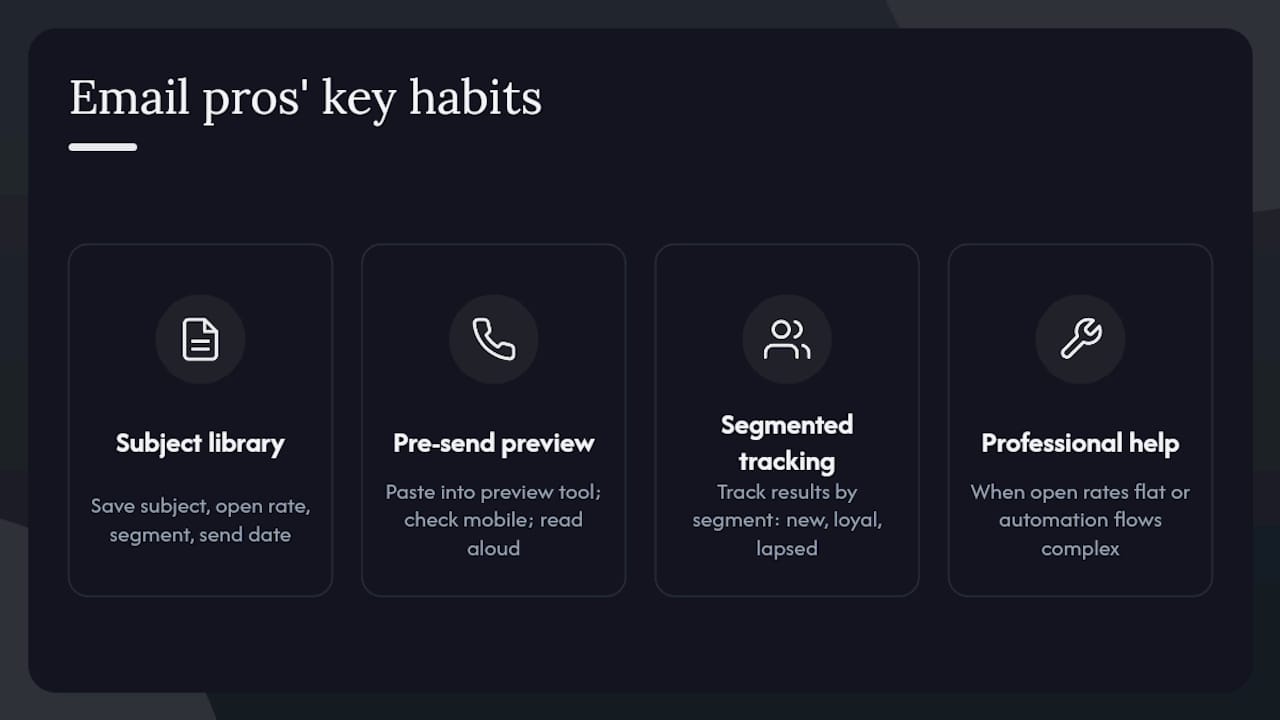
Strong email practitioners keep a subject-line library: a running document of every subject line they have sent, the open rate it achieved, the segment it went to, and the send date. After six months, patterns emerge. You stop guessing and start replicating what works for your specific audience.
A pre-send preview routine matters more than most people realize. Before every send, paste the subject line and preview text into your platform’s inbox preview tool, check the mobile view, and read the pair aloud. If it sounds like a spam email when you say it out loud, it probably reads like one in an inbox.
For teams, a segmented performance log is the single highest-leverage habit. Track subject-line results by segment (new subscribers vs. loyal buyers vs. lapsed customers), not just by campaign. The same subject line can perform very differently across those groups, and knowing that shapes every future send.
When open rates stay flat despite consistent testing, or when you are building complex automation flows with multiple triggered sequences, that is usually the point where professional support pays for itself. Take-action’s email strategy work covers exactly that territory.
When professional help is worth it
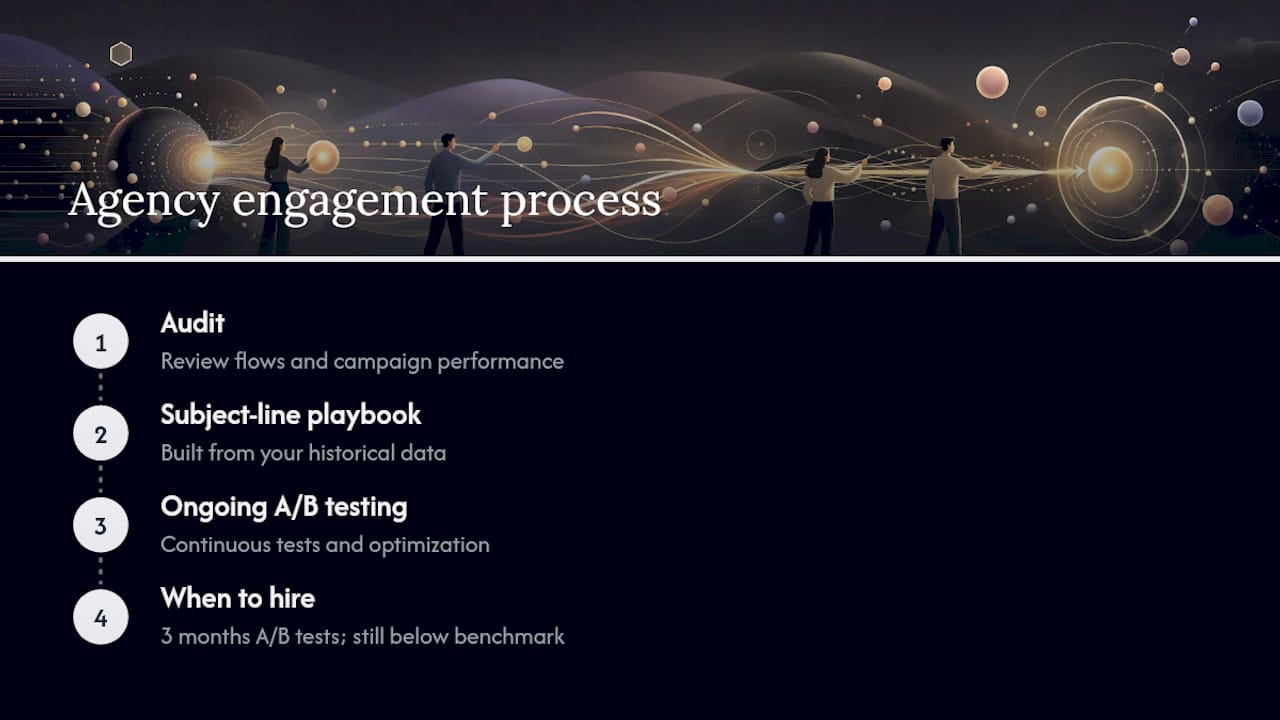
If you have run A/B tests for three months, applied the rules in this guide, and your open rates are still underperforming your industry benchmark, the problem is usually not the subject line. It is the segmentation, the send cadence, or the automation architecture underneath it.
Take-action is a specialized email marketing and retention agency that works primarily with ecommerce brands on Klaviyo. The engagement starts with an audit of your current flows and campaign performance, then moves into a subject-line playbook built from your own historical data, followed by an ongoing A/B testing cadence. You get a team that has already solved the problems you are running into, without the overhead of building that expertise in-house.
If your abandoned cart flow is underperforming, your welcome sequence is not converting, or you want to move beyond basic campaigns into segmented automation, book a strategy call to see what a structured engagement looks like.
Sources
- What We Learned Analyzing Billions of Email Subject Lines (With Findings From Cyber Week 2025) — Attentive
- Best Practices for Email Subject Lines - Mailchimp
- What Millions of B2B Emails Reveal About Subject Lines? — ReachIQ
- How to Improve Your Email Subject Line — HubSpot
- Email Subject Lines: Examples and Tips — Squarespace
- Statista — Daily number of e-mails worldwide
- Statista — Spam email traffic share
- Emojipedia