

What Is Klaviyo Revenue Reporting? A Guide for Ecommerce Marketers
Klaviyo revenue reporting is the platform’s system for measuring how much revenue comes from your email, SMS, and push campaigns. The core number is Klaviyo‑attributed revenue (also called Klaviyo‑Attributed Value, or KAV): sales the platform links to a message when a customer converts inside a set attribution window. Before you trust a single dashboard number, run three checks:
- Confirm your conversion metric. Most accounts default to Placed Order, but yours might be set to something else.
- Check your attribution windows per channel. Email, SMS, and push don’t share the same default lookback period.
- Match the view to the question. Use the Home dashboard for account health, Metrics or Custom reports for a single campaign or flow.
Attribution settings and your chosen conversion metric change the numbers you see. Document both once, and Klaviyo becomes a reliable source of truth instead of a moving target.
Key Takeaways
Klaviyo’s attributed revenue reflects sales tied to messages within a configurable window, and the conversion metric and attribution model you choose directly shape every number you see.
| Point | Details |
|---|---|
| Attribution isn’t total sales | Attributed revenue only counts purchases linked to a message inside its lookback window. |
| Windows shape the numbers | Default windows are 5 days for email/SMS and 24 hours for push on newer accounts. |
| Model choice changes credit | Last-touch gives full credit to one message; linear splits it evenly across touchpoints. |
| Preview before changing settings | The Model comparison tool shows the impact of a model or window change before you apply it. |
| Work with a specialist when needed | Take-action offers attribution audits and dashboard builds for teams unsure their Klaviyo numbers are accurate. |
Table of Contents
- What Does Klaviyo-Attributed Revenue Actually Measure?
- Where Do You Find Attributed Revenue in Klaviyo?
- How Does Klaviyo’s Attribution Model Work?
- Why Do Attributed and Total Revenue Not Match?
- How Do You Change Attribution Settings Safely?
- Which Revenue Metrics Actually Matter?
- What Should You Do When Revenue Numbers Look Wrong?
- How Should Ecommerce Teams Operationalize This Reporting?
- Frequently Asked Questions
- Sources
What Does Klaviyo-Attributed Revenue Actually Measure?
Klaviyo‑attributed revenue counts a sale as “yours” when a customer engages with a message, typically an open or click, and completes a purchase within that channel’s attribution window. It is not the same as total store revenue. Say you send an abandoned cart email at 9 a.m. A customer clicks it at noon, browses for two hours, then buys at 2 p.m. That sale gets attributed to the email because it fell inside the lookback window.
A short glossary helps here, since Klaviyo’s UI uses specific terms:
- Attributed revenue: sales tied to a Klaviyo message within its window.
- Unattributed revenue: sales Klaviyo can’t connect to a message, either because no message was involved or the window closed first.
- Conversion metric: the event Klaviyo counts as a “sale,” usually Placed Order.
- Rev/rec (revenue per recipient): attributed revenue divided by the number of people who received the message.
Pro Tip: Rev/rec is often more useful than raw attributed revenue for comparing two campaigns with very different list sizes. A $500 campaign to 200 people can outperform a $2,000 campaign to 5,000 people on a per‑recipient basis, and that gap tells you more about list quality than the dollar totals do.
Where Do You Find Attributed Revenue in Klaviyo?
Three main places hold the numbers, and each answers a different question.
- Home dashboard, Business performance summary card. This gives you the account‑level view: total revenue alongside the portion Klaviyo attributes, broken out by flows versus campaigns and by channel.
- Analytics → Metrics tab. Select the Placed Order metric, toggle between Total and Value, and filter by source to see revenue at the metric level rather than the account level.
- Custom reports and Overview dashboards. These support deeper segmentation, including revenue by property like signup source or city, plus scheduled exports for recurring reviews.
Use the dashboard for a quick pulse check on the business. Use Metrics when you need to isolate one campaign’s contribution. Use Custom reports when someone asks “which segment actually drives revenue” and a summary card won’t cut it.
How Does Klaviyo’s Attribution Model Work?
By default, Klaviyo uses last‑touch attribution: full credit for a sale goes to the last Klaviyo message the customer engaged with before converting. Accounts on Marketing Analytics or Advanced KDP can switch to linear attribution instead, which splits credit evenly. If a customer clicked three messages before buying, each one gets a third of the sale under a linear model.
Windows matter just as much as the model. New accounts created after October 9, 2024 default to a 5-day lookback for email and SMS, and 24 hours for push, and each channel’s window is adjustable separately in settings.
| Attribution model | How credit is assigned | Best fit |
|---|---|---|
| Last-touch (default) | 100% to the final message engaged with before purchase | Simple reporting, single-channel programs |
| Linear | Split evenly across every message engaged with | Multi-touch journeys, cross-channel programs |
Klaviyo’s multi‑channel logic checks each channel’s window independently and awards credit to whichever channel’s window is still open when the purchase happens. There’s also a date wrinkle worth knowing: some reports group revenue by conversion date, others by send date, which can make a campaign sent January 31 show revenue in February if the purchase happened after midnight.
Pro Tip: Set window length based on your actual purchase cycle. A five-day window makes sense for impulse categories, but a supplement brand with a 10-day consideration cycle should extend it, and test the change first in the Model comparison tool before rolling it out.
Why Do Attributed and Total Revenue Not Match?
A gap between Klaviyo’s attributed revenue and your store’s total sales is normal, not a bug. The usual causes:
- The purchase happened outside the attribution window.
- Reporting used send‑date grouping while the sale posted on a different conversion date.
- A cross‑device session broke the link between click and purchase.
- An integration lag delayed order data syncing to Klaviyo.
- The conversion metric selected in a report doesn’t match Placed Order.
- Fractional credit under a linear model spread revenue across several messages instead of one.
When numbers look wrong, work through this order:
- Confirm the conversion metric matches Placed Order (or whatever your store actually uses).
- Check that attribution windows are set consistently across the channels you’re comparing.
- Verify the date range in your report aligns with the date range in your store’s own sales data.
A common scenario: a flow email goes out, the customer opens it, gets distracted, and orders three days later on a different device with no click recorded. If the window has closed or the click never registered, that sale shows up as unattributed even though the email arguably influenced it.
How Do You Change Attribution Settings Safely?
Adjusting attribution windows or switching models is straightforward, but skipping the preview step is how teams end up confused by their own dashboards.
- Go to Analytics settings to select or change your account’s default conversion metric.
- Open channel-specific settings to adjust the lookback window for email, SMS, and push individually.
- Navigate to the Model comparison tool to preview how a model or window change would shift attributed and unattributed revenue before applying it.
- Apply the change only after confirming the preview matches what you expect for both campaigns and flows.
Linear attribution and some Marketing Analytics features sit behind Advanced KDP or Marketing Analytics plans, so not every account has that toggle available.
Pro Tip: Never flip a live account straight from last-touch to linear. Preview it first. Changing the model retroactively reshapes how historical data reads, and a report that looked fine yesterday can look completely different tomorrow.
Which Revenue Metrics Actually Matter?
Not every number in Klaviyo deserves equal attention. Here’s what to watch and when:
- Attributed revenue tells you channel-level contribution to sales. Use it to compare email against SMS against push.
- Total revenue is your reality check against store-wide sales.
- Rev/rec measures list quality and message relevance, independent of list size.
- Placed order count shows conversion volume, useful alongside revenue to catch a high-dollar, low-volume campaign.
- Average order value flags whether a campaign is pulling in bigger baskets or just more transactions.
A quick rev/rec calculation: a flow generates $4,000 in attributed revenue from 2,000 recipients, giving you a rev/rec of $2.00. Compare that against a second flow generating $4,000 from 8,000 recipients ($0.50 rev/rec), and the first flow is clearly working harder per person, even though the top-line revenue looks identical. Klaviyo’s own reporting features support this kind of side‑by‑side comparison across flows and campaigns natively.
What Should You Do When Revenue Numbers Look Wrong?
Run through this before assuming Klaviyo made an error:
- Check integration logs to confirm order events are syncing on schedule.
- Verify the conversion metric and date range match what you’re comparing it against.
- Compare Klaviyo’s attributed revenue against your ecommerce platform’s gross sales over the identical period.
- Send a test message and confirm a test conversion registers correctly.
If the integration logs show missing or delayed events, that’s typically an internal engineering or API mapping issue, not a Klaviyo platform problem, so escalate accordingly. A fast reconciliation trick: compare placed orders over a 7 to 14 day window and confirm the same attribution windows were applied to both sides of the comparison.
How Should Ecommerce Teams Operationalize This Reporting?
Five habits separate teams who trust their Klaviyo numbers from teams who argue about them every month:
- Document your conversion metric and attribution windows in a shared doc, not just in someone’s head.
- Treat Klaviyo as the single source of truth for message attribution, and stop cross-checking it against tools measuring something different.
- Build two dashboards: one for account health, one for campaign-level deep dives. Our guide on maximizing email revenue with Klaviyo walks through how to structure both.
- Schedule a recurring review, including a Model comparison check any time you’re considering a settings change.
- Audit integrations quarterly to catch sync issues before they distort a full quarter of reporting, a practice our piece on measuring marketing ROI covers in more depth.
Bring in an implementation partner when you’re managing multiple brands, several overlapping integrations, or event tracking that’s never been fully audited.
Pro Tip: Version your attribution settings the same way you’d version code. Note the date you changed a window or model, so a revenue dip six weeks later doesn’t turn into a mystery.
What Do Attribution Audits Usually Turn Up?
Most audits turn up the same problem: a conversion metric quietly set to something other than Placed Order months ago, throwing every report off since. In one recent case, aligning the metric and previewing the fix in the Model comparison tool brought attributed revenue back in line with what the brand’s finance team expected within a single reporting cycle.

Get an Attribution Audit From Take-action
Guessing at your Klaviyo numbers gets expensive fast, especially when a misconfigured conversion metric has been quietly skewing months of reports. Take-action specializes in exactly this: Klaviyo setup, attribution audits, and building the dashboard and custom report structure your team actually needs to trust the numbers.
We work as a scoped audit or an ongoing managed engagement, depending on how deep the issues run. If your attributed revenue and total sales haven’t matched in a while, or you’ve never actually confirmed which conversion metric your account uses, request an attribution audit and we’ll walk through your settings together.
Frequently Asked Questions
What is Klaviyo revenue reporting, in one sentence? It’s Klaviyo’s system for measuring and displaying attributed revenue, which is sales the platform links to your email, SMS, and push messages within a set attribution window.
Why doesn’t my attributed revenue match my store’s total sales? The two numbers measure different things. Attributed revenue only counts purchases Klaviyo can tie to a message, so window length, cross-device sessions, and integration sync all create gaps.
Can I change how Klaviyo attributes revenue? Yes. You can adjust attribution windows per channel and, on Marketing Analytics or Advanced KDP plans, switch from last‑touch to linear attribution, previewing changes first with the Model comparison tool.
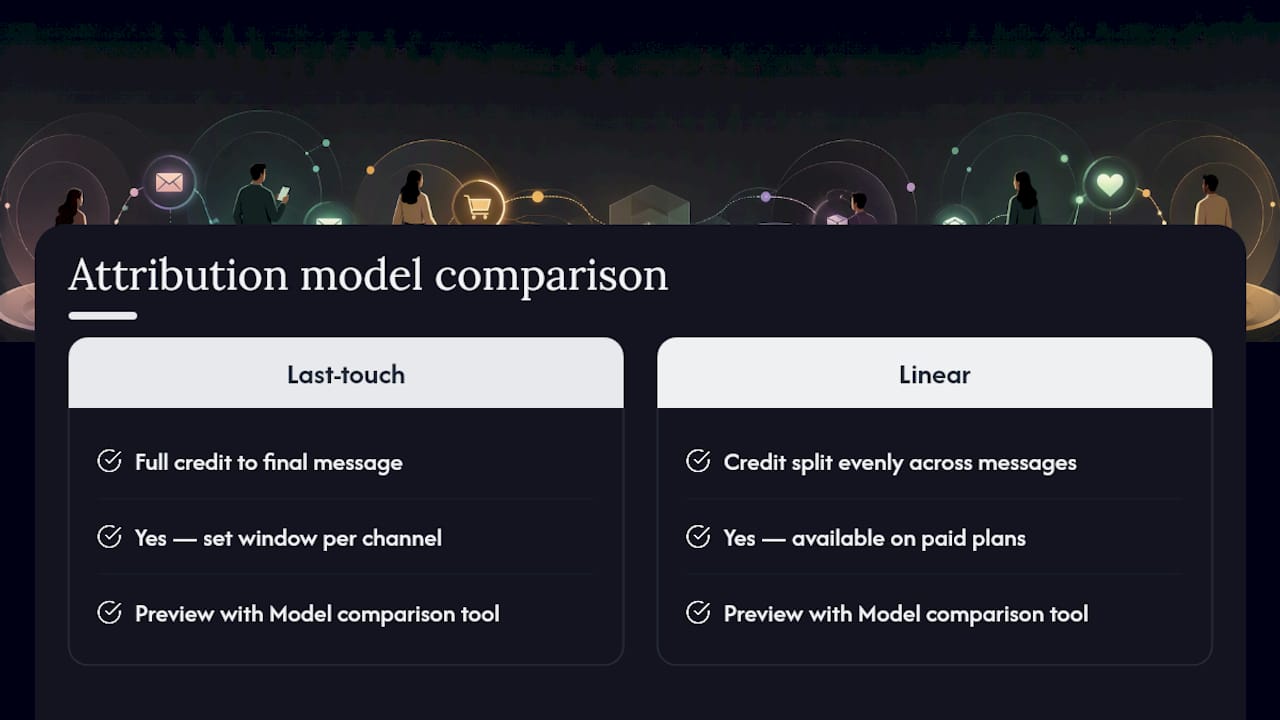
What’s the difference between last-touch and linear attribution? Last-touch gives full credit to the final message a customer engaged with before buying. Linear splits credit evenly across every message they engaged with in the path to purchase.
Sources
- Understand attribution in Klaviyo - Create measurable marketing goals | Klaviyo Academy
- Getting started with analytics or overview dashboards | Klaviyo Help Center